
Making music is rarely one step. You split a song into stems, find its key, change the pitch, master the result and cut a ringtone, and on most sites every one of those steps is a different page, a new tab and another upload. SongUp AI Studio puts every SongUp AI tool on one page instead. This guide explains what is inside, how much it costs (nothing) and how to use it.
SongUp AI Studio in 30 seconds
- What it is: all 38 SongUp AI tools in one studio at songupai.com/studio: the AI song maker, Hum to Song, stem separator, karaoke maker, AI mastering, mashups, audio effects, analysers, instruments, an audio editor and DJ mode.
- Price: 100% free. No Studio fee, no per-use charge, and the 35 free tools use no credits, with unlimited runs.
- Who can use it: anyone on any paid SongUp AI plan (Lite, Pro, Pro Plus or the 30-day Pro pass). Anyone can open the page and look around.
- Credits: only the three tools that make a brand-new song (AI Song Maker, Hum to Song, Background Music) use your plan's song credits, exactly as on their own pages.
- Privacy: the audio tools run in your browser, so your files stay on your device.
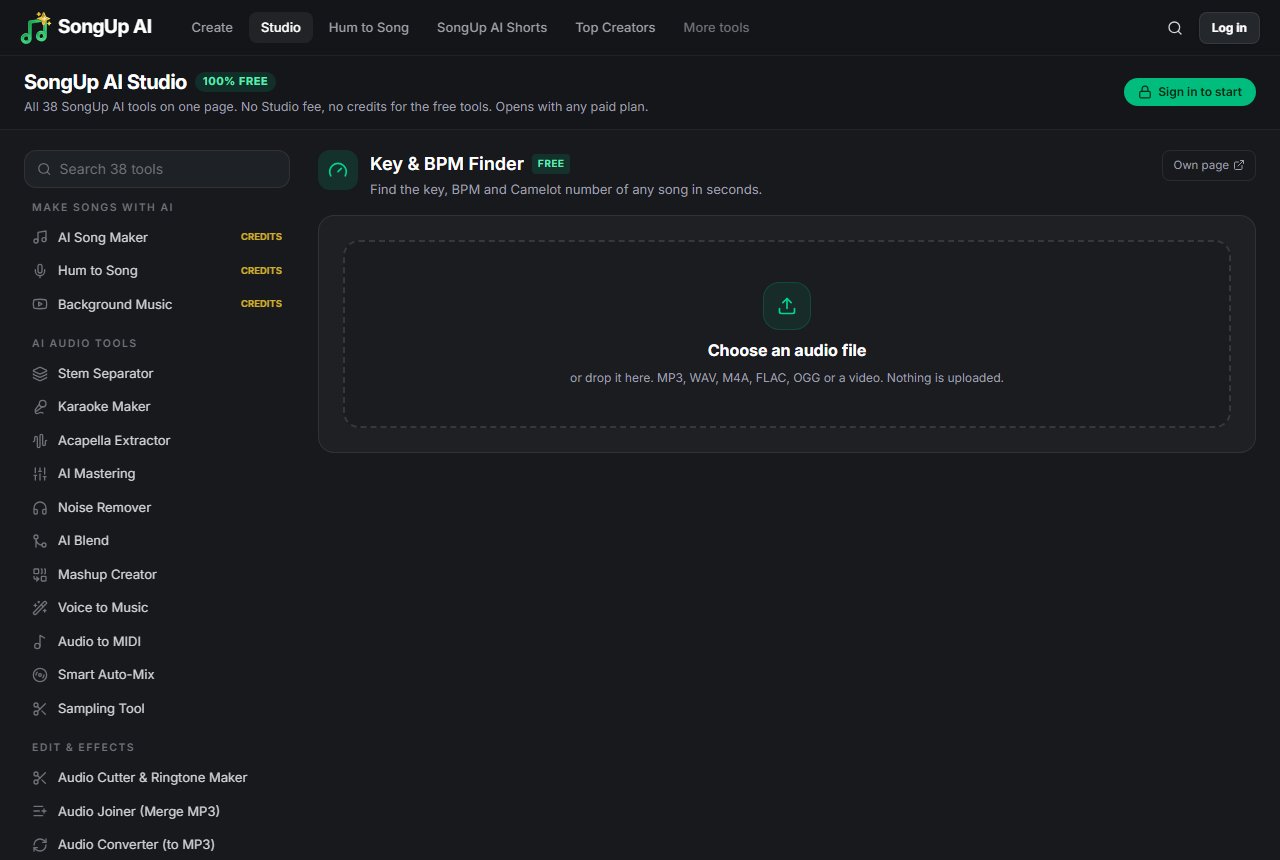
What is SongUp AI Studio?
SongUp AI Studio is an all-in-one online music studio. Instead of a separate page for each tool, the Studio shows every SongUp AI tool in one list. Pick a tool and it opens right there, on the same page. Pick another and that one opens. The last few tools you used stay open in the background, so a song you loaded into the stem separator is still waiting when you come back to it after finding its key.
It is the same tool you would get on its own page, with the same quality and the same downloads. The only difference is that everything is together.
Is SongUp AI Studio really free?
Yes. The Studio has no price of its own:
- No Studio fee. You never pay to open or use the Studio.
- No credits for the free tools. 35 of the 38 tools use no credits at all, with no daily limit and no watermark. That includes the Stem Separator and Karaoke Maker.
- No per-use charge. Run a tool as many times as you like.
The Studio is a members' space, so it opens with any paid SongUp AI plan. Lite, Pro, Pro Plus and the 30-day Pro pass all count. If you are not signed in, pressing a tool's button asks you to sign in; on a free account it asks for any paid plan, and the Studio itself stays free. Plans are on the pricing page.
The three tools that make a brand-new song, AI Song Maker, Hum to Song and Background Music, use your plan's song credits, just as they do on their own pages. Everything else is free.
What is inside the Studio
The tools are grouped by what you are doing.
Make songs with AI
- AI Song Maker: a full song with vocals and lyrics from an idea or your own words, in 76 languages.
- Hum to Song: hum or sing a tune and get a full song built on your melody.
- Background Music: paste a YouTube link and AI composes music that fits the video.
AI audio tools
- Stem Separator: split any song into vocals, drums, bass and other instruments.
- Karaoke Maker: remove the vocals and keep a clean instrumental.
- Acapella Extractor: pull out the clean vocals for remixes and covers.
- AI Mastering: make a mixed track loud and radio-ready.
- Noise Remover: clean up hum, hiss and background noise.
- AI Blend and Mashup Creator: combine two songs into a new track.
- Voice to Music, Audio to MIDI, Smart Auto-Mix and the Sampling Tool.
Edit and effects
Audio cutter and ringtone maker, audio joiner, audio converter (video, WAV and M4A to MP3), pitch and key changer, speed changer, slowed + reverb, sped up and nightcore, 8D audio, bass booster, volume booster and reverse audio.
Analyze
Key & BPM finder, chord recognition, LUFS loudness meter and tap tempo.
Play, record and write
AI instruments you play with your keyboard, neural auto-tune, a voice recorder, guitar tuner, metronome, rhyme finder and chord progression generator.
Full apps
The multitrack Audio Editor and Pro DJ Mode open inside the Studio too, full size.
How to use SongUp AI Studio
- Open the Studio at songupai.com/studio.
- Pick a tool from the list on the left. On a phone, the tools sit in a bar at the top, grouped by type. Search finds any tool by name.
- Add your audio. Drop in a song or a recording, record with your microphone, or type an idea for a new song.
- Press the tool's button. The first time, sign in and choose any paid plan.
- Download the result, or move straight to the next tool without losing your place.
Every tool can also be opened on its own: the "Own page" link at the top right of each tool takes you there.
A real workflow: from a song to a karaoke ringtone
Here is the kind of job the Studio is built for. Say you want a karaoke version of a song, in a key that suits your voice, as a 30-second ringtone:
- Open Key & BPM Finder and drop the song in. It shows the key, for example A minor at 92 BPM.
- Switch to Karaoke Maker and add the same file. The vocals are removed and you download the instrumental.
- Switch to Pitch & Key Changer, add the instrumental and move it down two semitones.
- Switch to Audio Cutter & Ringtone Maker, trim the chorus to 30 seconds and add a fade.
Four tools, one page, no tabs.
Does it work on a phone?
Yes, in Chrome or Safari on Android and iPhone. The AI separation tools (Stem Separator, Karaoke Maker and Acapella Extractor) run on your device's processor, so they are much faster on a laptop.
Questions
Is SongUp AI Studio free? Yes, 100%. There is no Studio fee, no per-use charge and no credits for its 35 free tools. It opens with any paid plan.
Why do I need a paid plan if it is free? The Studio is included with every paid plan, as a members' space. You never pay for the Studio itself or for a run of its free tools.
Are my files uploaded? The audio tools run in your browser, so your files stay on your device. The song makers make songs on SongUp AI's servers, and the Rhyme Finder sends the word you type to the free Datamuse word API.
Is it available in my language? The AI Song Maker writes and sings songs in 76 languages, and every SongUp AI language page, from Arabic and Urdu to Hindi and Spanish, explains in its own language that the Studio is free.
Ready to try it? Open SongUp AI Studio.