
The fastest way to start playing piano is to learn a song you already know. Simple melodies like Twinkle Twinkle Little Star, Ode to Joy and Happy Birthday use only a few notes, sit under one hand, and sound right the moment you play them correctly.
Below are 11 easy piano songs for beginners, ordered from easiest to hardest, each with the letter notes and the computer keyboard keys to play it on a virtual piano. All of them are public domain, so you can play, record and share them freely. You can practise every song in the free Virtual Piano: pick a song, press Play along, and the next key lights up and waits for you.
The easiest piano songs for beginners, in short
- Mary Had a Little Lamb: 4 notes (C D E G)
- Twinkle Twinkle Little Star: 6 notes, C to A
- Ode to Joy: 5 notes plus one low G
- When the Saints Go Marching In: 5 notes, C to G
- Jingle Bells: 5 notes, mostly E
- Happy Birthday: 8 notes, one octave jump
- Brahms' Lullaby
- Amazing Grace
- Silent Night
- Canon in D (melody)
- Für Elise (opening)
How to read the notes in this guide
Each song has two lines:
- Notes: the note names. C4 is middle C, the C closest to the middle of a piano. The number is the octave: C5 is the C one octave higher, G3 the G just below middle C. A # (sharp) is the black key just to the right.
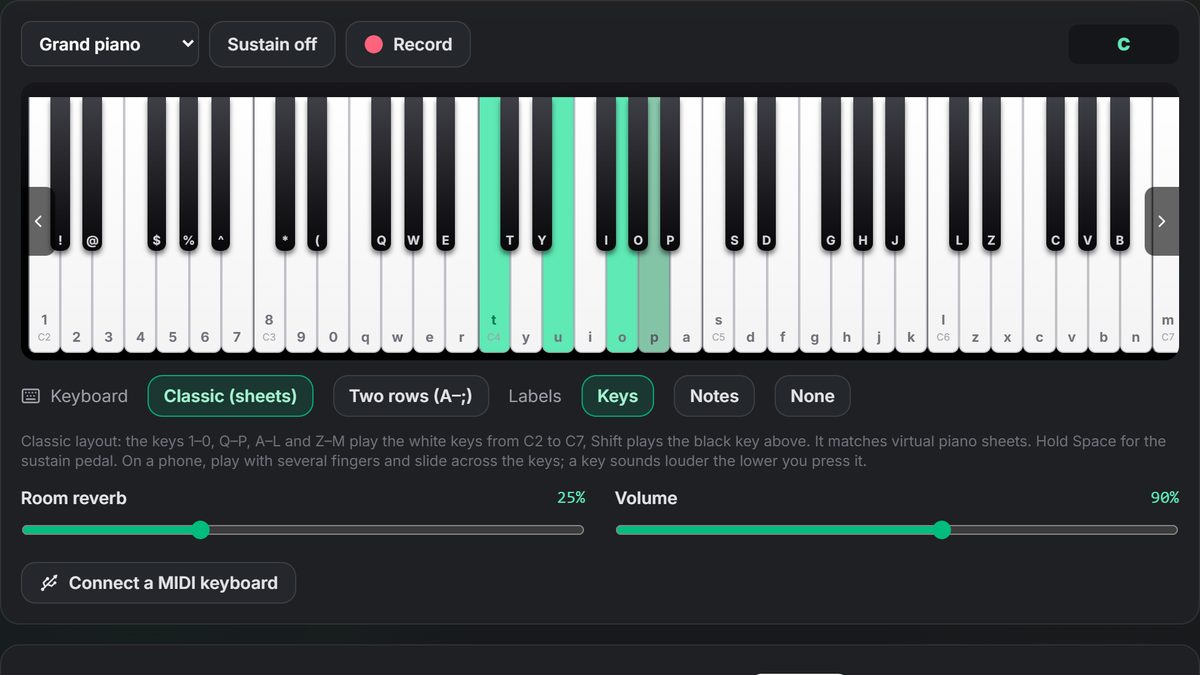
- Keys: the computer keyboard key that plays each note in the Virtual Piano's Classic (sheets) layout, the same layout used by most "virtual piano sheets" online. Lowercase letters are white keys; an uppercase letter or symbol means hold Shift to play the black key above.
In the Classic layout, the number row and the letter rows run left to right across the piano: 1 is C2 at the low end, t is middle C (C4), and m is C7 at the top.
Middle C and the notes around it:
| Note | C4 | D4 | E4 | F4 | G4 | A4 | B4 | C5 |
|---|---|---|---|---|---|---|---|---|
| Key | t | y | u | i | o | p | a | s |
On a real piano or a touchscreen, use the note names. On a computer keyboard, use the keys. Either way, set Labels to Notes or Keys in the Virtual Piano to see them printed on the keyboard.
1. Mary Had a Little Lamb
Why it's easy: only four different notes, all next to each other except one, and the rhythm is steady.
Notes:
E4 D4 C4 D4 E4 E4 E4 · D4 D4 D4 · E4 G4 G4 · E4 D4 C4 D4 E4 E4 E4 E4 · D4 D4 E4 D4 C4
Keys:
u y t y u u u · y y y · u o o · u y t y u u u u · y y u y t
Fingers (right hand): thumb on C, index on D, middle on E, little finger on G.
2. Twinkle Twinkle Little Star
Why it's easy: the melody climbs, then steps back down one note at a time. Every phrase repeats.
Notes:
C4 C4 G4 G4 A4 A4 G4 · F4 F4 E4 E4 D4 D4 C4 · G4 G4 F4 F4 E4 E4 D4 · G4 G4 F4 F4 E4 E4 D4 · C4 C4 G4 G4 A4 A4 G4 · F4 F4 E4 E4 D4 D4 C4
Keys:
t t o o p p o · i i u u y y t · o o i i u u y · o o i i u u y · t t o o p p o · i i u u y y t
Tip: hold the G at the end of each first line (the "star") for two beats.
3. Ode to Joy (Beethoven)
Why it's easy: the theme from Beethoven's Ninth Symphony moves almost entirely by step, using five neighbouring notes under five fingers.
Notes:
E4 E4 F4 G4 G4 F4 E4 D4 C4 C4 D4 E4 E4 D4 D4 · E4 E4 F4 G4 G4 F4 E4 D4 C4 C4 D4 E4 D4 C4 C4 · D4 D4 E4 C4 D4 E4 F4 E4 C4 D4 E4 F4 E4 D4 C4 D4 G3 · E4 E4 F4 G4 G4 F4 E4 D4 C4 C4 D4 E4 D4 C4 C4
Keys:
u u i o o i u y t t y u u y y · u u i o o i u y t t y u y t t · y y u t y u i u t y u i u y t y w · u u i o o i u y t t y u y t t
Rhythm tip: the first line ends "E… D D": hold the E a little longer and the first D shorter. The Play along mode handles the timing for you; press Listen first to hear it.
4. When the Saints Go Marching In
Why it's easy: five notes (C, D, E, F, G), and the opening pattern C–E–F–G repeats three times.
Notes:
C4 E4 F4 G4 · C4 E4 F4 G4 · C4 E4 F4 G4 E4 C4 E4 D4 · E4 E4 D4 C4 C4 E4 G4 G4 F4 · E4 F4 G4 E4 C4 D4 C4
Keys:
t u i o · t u i o · t u i o u t u y · u u y t t u o o i · u i o u t y t
5. Jingle Bells
Why it's easy: the chorus is mostly the same note (E) repeated, with short steps away and back.
Notes:
E4 E4 E4 · E4 E4 E4 · E4 G4 C4 D4 E4 · F4 F4 F4 F4 F4 E4 E4 E4 E4 E4 D4 D4 E4 D4 G4 · E4 E4 E4 · E4 E4 E4 · E4 G4 C4 D4 E4 · F4 F4 F4 F4 F4 E4 E4 E4 E4 G4 G4 F4 D4 C4
Keys:
u u u · u u u · u o t y u · i i i i i u u u u u y y u y o · u u u · u u u · u o t y u · i i i i i u u u u o o i y t
6. Happy Birthday
Why it's a step up: it starts below middle C and has one big jump (from G3 up to G4) in the third line. Everyone knows it, so you'll hear mistakes immediately, which helps.
Notes:
G3 G3 A3 G3 C4 B3 · G3 G3 A3 G3 D4 C4 · G3 G3 G4 E4 C4 B3 A3 · F4 F4 E4 C4 D4 C4
Keys:
w w e w t r · w w e w y t · w w o u t r e · i i u t y t
Tip: "Happy Birthday" entered the public domain in the United States in 2016, so you can play it in videos freely.
7. Brahms' Lullaby
Why it's a step up: the melody leaps (E up to G, G up to C5), so your hand has to move instead of staying in one place.
Notes:
E4 E4 G4 · E4 E4 G4 · E4 G4 C5 B4 A4 A4 G4 · D4 E4 F4 D4 · D4 E4 F4 · D4 F4 B4 A4 G4 B4 C5
Keys:
u u o · u u o · u o s a p p o · y u i y · y u i · y i a p o a s
8. Amazing Grace
Why it's a step up: it uses the notes of a G major chord (G, B, D) and leaps between them. Play it slowly; it's in 3/4 time, so count "1-2-3".
Notes:
D4 G4 B4 G4 B4 A4 G4 E4 D4 · D4 G4 B4 G4 B4 A4 D5 · B4 D5 B4 D5 B4 G4 D4 E4 G4 G4 E4 D4 · D4 G4 B4 G4 B4 A4 G4
Keys:
y o a o a p o u y · y o a o a p d · a d a d a o y u o o u y · y o a o a p o
9. Silent Night
Why it's a step up: a wider range (from C4 up to F5) and longer phrases. Also in 3/4 time.
Notes:
G4 A4 G4 E4 · G4 A4 G4 E4 · D5 D5 B4 · C5 C5 G4 · A4 A4 C5 B4 A4 G4 A4 G4 E4 · A4 A4 C5 B4 A4 G4 A4 G4 E4 · D5 D5 F5 D5 B4 C5 E5 · C5 G4 E4 G4 F4 D4 C4
Keys:
o p o u · o p o u · d d a · s s o · p p s a p o p o u · p p s a p o p o u · d d g d a s f · s o u o i y t
10. Canon in D (Pachelbel, melody)
Why it's harder: it's in D major, so it uses two black keys: F# and C#. In the Keys line, the uppercase letters (G, S, I) are Shift + that key.
Notes:
F#5 E5 D5 C#5 B4 A4 B4 C#5 · D5 C#5 B4 A4 G4 F#4 G4 E4 · D4 F#4 A4 G4 F#4 D4 F#4 E4 · D4 B3 D4 A4 G4 B4 A4 G4
Keys:
G f d S a p a S · d S a p o I o u · y I p o I y I u · y r y p o a p o
Tip: play it slowly and evenly. Canon in D sounds beautiful at any speed, and it's the classic wedding entrance piece.
11. Für Elise (Beethoven, opening)
Why it's the hardest here: the famous opening rocks quickly between E and D# (a black key), then the left and right hands share the melody. Here it's written as one line you can play with one hand.
Notes:
E5 D#5 E5 D#5 E5 B4 D5 C5 A4 · C4 E4 A4 B4 · E4 G#4 B4 C5 · E4 E5 D#5 E5 D#5 E5 B4 D5 C5 A4 · C4 E4 A4 B4 · E4 C5 B4 A4
Keys:
f D f D f a d s p · t u p a · u O a s · u f D f D f a d s p · t u p a · u s a p
Tip: D (Shift+d) is D#5 and O (Shift+o) is G#4. Practise the first five notes alone until they're smooth before adding the rest.
How to practise these songs (and actually improve)
- Listen first. In the Virtual Piano, choose the song and press Listen. You'll hear the melody at the right speed, on a recorded grand piano unless you've picked another instrument.
- Play along. Press Play along. The next key lights up; press it and the song moves on. A wrong key flashes red and waits, so you can't skip ahead by mistake.
- Learn it in phrases. Each song above is split by · into phrases. Learn one phrase until you can play it without looking, then add the next.
- Slow is fast. Play slowly and evenly before you play fast. Speed comes on its own.
- Record yourself. Press Record, play the song, then Play back. Hearing yourself is the quickest way to catch uneven rhythm.
- Use the sustain pedal. Hold Space (or press Sustain on a phone) to let notes ring, like the right pedal on a real piano. It makes slow songs like Silent Night and Amazing Grace sound fuller.
- Fingers, not one finger. On a touchscreen or a MIDI keyboard, use thumb to little finger (1–5) on five neighbouring keys. Songs 1–5 all fit under one hand position.
Playing on a computer keyboard vs a real piano
A computer keyboard is a great way to learn melodies and note names, and it's how most people play on sites like virtual piano sheets. But a real piano (or a MIDI keyboard) adds two things: dynamics (how hard you press) and two hands.
You can get both in the Virtual Piano:
- MIDI keyboard: press Connect a MIDI keyboard (Chrome or Edge on a computer). Velocity and the sustain pedal both work, and the sound is a sampled concert grand.
- Touchscreen: on a phone or tablet, play with several fingers at once; a key sounds louder the lower you press it, like a real key.
When you're ready, try playing the chords under a melody with your left hand. The Virtual Piano names any chord you hold (C, Am, G7 and so on), so you can check your shapes. The free Chord Progression Generator gives you progressions to practise.
Frequently asked questions
What is the easiest song to play on the piano?
Mary Had a Little Lamb: it uses only four notes (C, D, E and G) under one hand. Twinkle Twinkle Little Star and Ode to Joy are close behind.
What are piano letter notes?
Melodies written as note names (C, D, E, F, G, A, B) instead of sheet music. They're the easiest way to start, though they don't show rhythm, which is why listening first helps.
What is middle C?
The C closest to the centre of a full piano, written C4. In the Virtual Piano's Classic layout it's the T key.
Can I learn piano on a computer keyboard?
Yes, for melodies, note names and simple songs. For two-handed playing and dynamics, connect a MIDI keyboard; the Virtual Piano supports one in Chrome and Edge.
How do I play black keys on a computer keyboard?
In the Classic (sheets) layout, hold Shift and press the key of the white note just below. Shift+t plays C#4, for example.
Is the Virtual Piano free?
Yes. It plays without an account. Downloading a recording as WAV, MP3 or MIDI needs a free SongUp AI account.
Are these songs copyright-free?
Yes. All 11 songs here are in the public domain, so you can play, record and share them, including in videos.
How long does it take to learn an easy piano song?
Most beginners can play Mary Had a Little Lamb or Twinkle Twinkle in 10–20 minutes. Songs 6–11 take a few practice sessions each.
Can I turn a melody I play into a full song?
Yes. Once you know the melody, hum or sing it into Hum to Song, which builds a full song with vocals on your tune, or describe a song to the AI song maker.
The bottom line
Start with Mary Had a Little Lamb, Twinkle Twinkle and Ode to Joy, then work down the list. Use the letter notes or keyboard keys above, listen before you play, and learn one phrase at a time. Open the free Virtual Piano, pick a song and press Play along: the next key lights up, and you'll play your first full song in minutes. For more on the computer keyboard layout, see how to play piano on a computer keyboard.