
Lo-fi hip-hop is the sound of a dusty record, a lazy drum loop and a few warm chords played on repeat. It is also one of the friendliest genres to start producing: you don't need expensive gear, a perfect mix or a big vocal. You need a groove that nods, a texture that feels old, and a little patience with the details.
This guide walks you through making a lo-fi hip-hop beat from scratch: the tempo and drums, the swing that makes it nod, the chords and melody, the vocal chops, and the "lo-fi" texture itself (bit crushing, tape wobble and vinyl crackle). Every step works in any DAW, whether that's FL Studio, Ableton Live, Logic Pro or GarageBand. We'll also show the free browser tools we built at SongUp AI for each step, so you can make your first beat without installing anything.
How to make a lo-fi hip-hop beat, in short
- Set the tempo to 70–90 BPM.
- Program the drums: kick on 1 and the "and" of 3, snare on 2 and 4, soft 16th-note hi-hats.
- Add swing (about 54–62%) and push the snare slightly behind the beat. Try it free in the Drum Swing & Humanizer.
- Write jazzy chords: 7th and 9th chords, two to four of them, looping. The Chord Progression Generator helps.
- Add a melody or vocal chops. Chop any vocal you own in the Vocal Chop Maker.
- Make it sound old: bit crush, tape wobble, a soft top end and vinyl crackle. Do it in one pass with the Lo-Fi Effect.
- Arrange a 2–3 minute loop with small changes every 8 bars, and keep the mix soft.
What makes a beat sound "lo-fi"?
"Lo-fi" means low fidelity: sound that is less than perfect on purpose. In lo-fi hip-hop that imperfection comes from a few specific places, and knowing them makes the genre much easier to produce.
| Ingredient | What you hear | How producers get it |
|---|---|---|
| Slow tempo | A relaxed, head-nodding pace | 70–90 BPM, sometimes as low as 60 |
| Swing and loose timing | Drums that lean back instead of marching | Swing on the 16th notes, a late snare, unquantized hits |
| Jazzy harmony | Warm, slightly sad, unresolved chords | 7th, 9th and 11th chords, often on Rhodes or piano |
| Sampler grit | A crunchy, grainy top end | Lower bit depth (12-bit) and sample rate (around 26 kHz) |
| Tape character | A gentle pitch wobble, soft saturation, dull highs | Wow and flutter, saturation, a high-cut filter |
| Vinyl noise | Crackle, pops and hiss under the music | A vinyl or noise layer, kept quiet |
| Soft mix | Nothing sharp, nothing too loud | Rolled-off highs, gentle compression, low-passed drums |
The rest of this guide takes these one at a time. If you only remember one thing: lo-fi is about feel and texture, not about bad quality. A great lo-fi beat is carefully made to sound casual.
Step 1: Pick a tempo between 70 and 90 BPM
Most lo-fi hip-hop sits between 70 and 90 BPM. Around 85 is the classic head-nod tempo; 70–75 feels sleepy and late-night. If you already have a sample or a chord loop you want to build around, find its tempo first with the free Key & BPM Finder, or tap along with Tap Tempo.
Keep the tempo steady for the whole track. The "lazy" feel comes from where the drums land inside each beat, not from slowing the track down.
Step 2: Program a simple drum pattern
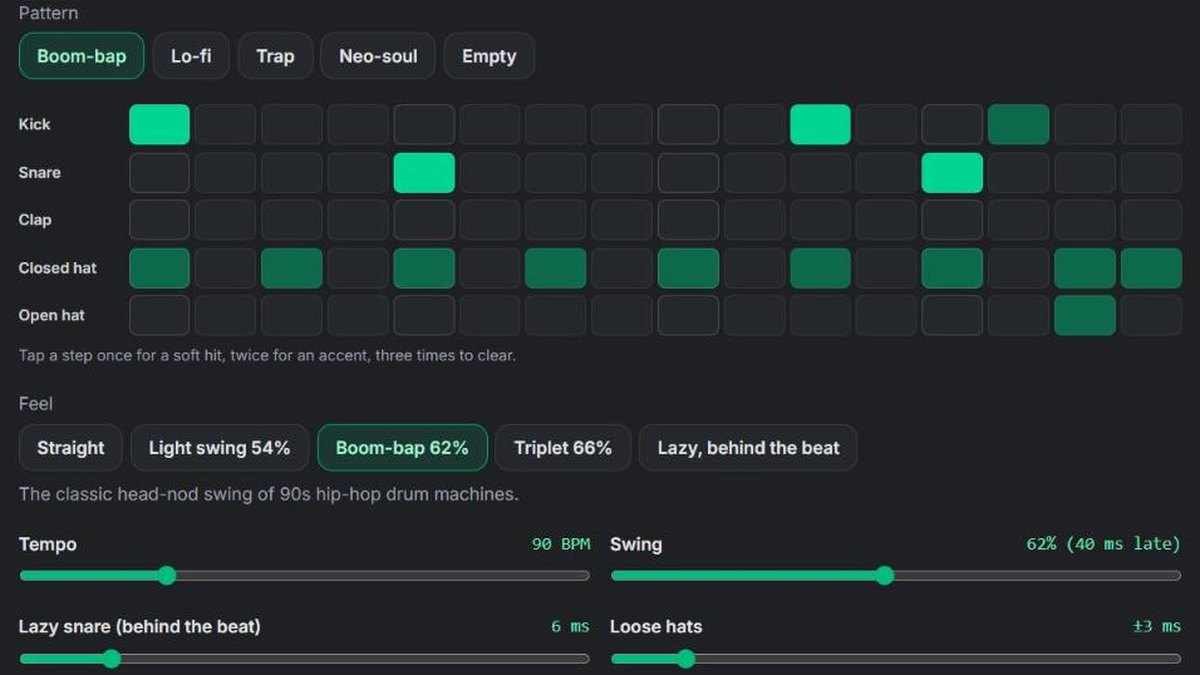
Lo-fi drums are simple. The magic is in how they're played, which we'll handle in the next step. Start with a basic boom-bap pattern on a 16-step grid (one bar of 16th notes):
| Drum | Where it plays (16 steps) | Tip |
|---|---|---|
| Kick | Step 1, step 11, sometimes step 8 or 14 | Keep it round and soft, not clicky |
| Snare | Steps 5 and 13 (beats 2 and 4) | A rim shot or a soft, dusty snare works well |
| Closed hi-hat | Every other step (8th notes), or all 16 at low velocity | Vary the loudness: this is where the groove lives |
| Open hi-hat | Once per bar, often step 15 | Optional, gives a little lift |
Choose drum sounds that are already a bit dull: lo-fi drums rarely have bright, crisp transients. If your kit sounds too clean, the texture step (Step 6) will fix that.
In the Drum Swing & Humanizer you can start from the Lo-fi or Boom-bap pattern, or program your own: tap a step once for a soft hit, twice for an accent.
Step 3: Add swing and a human feel
This is the step that separates a lo-fi beat from a stiff drum loop. Real drummers don't play exactly on the grid. In lo-fi and boom-bap, the off-beat 16th notes are played slightly late (that's swing), and the snare often lands a few milliseconds behind the beat.
- Swing: delays every second 16th note. 50% is straight, 54% is a light bounce, 58–62% is the classic hip-hop drum-machine feel, and 66% is a full triplet shuffle.
- Late snare: pushing the snare and clap 5–25 milliseconds behind the beat gives the famous "lazy" or "drunk" feel. Keep the kick on the grid so the beat still hits.
- Loose hats and velocity: small random changes in timing and loudness make the hi-hats breathe, so no two hits are the same.
For a deep dive into the numbers, read our guide what is swing in music. In practice:
- Open the Drum Swing & Humanizer and pick the Boom-bap 62% or Lazy, behind the beat feel.
- Press Play and move the Swing slider while it loops. The display shows exactly how many milliseconds late the off-beats are at your tempo.
- Press New human take until a version grooves the way you like.
- Download it as a 4-bar MIDI file to drop into your DAW, or as an audio loop (WAV or MP3).
Already have drums in your DAW? Export the MIDI, upload it to the same tool, and download it back swung and humanized. In a DAW, the same idea is the swing knob in FL Studio's channel rack, Ableton's groove pool, or Logic's quantize swing.
Step 4: Write warm, jazzy chords
Lo-fi harmony borrows from jazz and neo-soul. Instead of plain triads, use seventh and ninth chords, which sound warm and slightly unresolved: perfect for a loop that never quite "ends".
Good starting progressions (shown in C major; move them to any key):
| Progression | Chords | Mood |
|---|---|---|
| ii–V–I | Dm9 – G13 – Cmaj9 | Classic jazzy, resolved |
| I–vi–ii–V | Cmaj7 – Am7 – Dm7 – G7 | Nostalgic, smooth |
| IV–iii–ii–I | Fmaj7 – Em7 – Dm7 – Cmaj7 | Gentle, falling |
| ii–iii–IV | Dm9 – Em7 – Fmaj7 | Dreamy, unresolved loop |
Play them on an electric piano (Rhodes-style), a soft piano, a nylon guitar or a mellow synth pad. Two to four chords, one or two bars each, looping, is plenty. Let the chords play slightly late or roll them (play the notes one after another rather than all at once) so they match the relaxed drums.
If you're stuck, the free Chord Progression Generator suggests progressions by key and mood and lets you hear them.
Step 5: Add a melody or vocal chops
Over the chords, you need something that catches the ear: a short melody, a guitar lick, a flute line, or vocal chops.
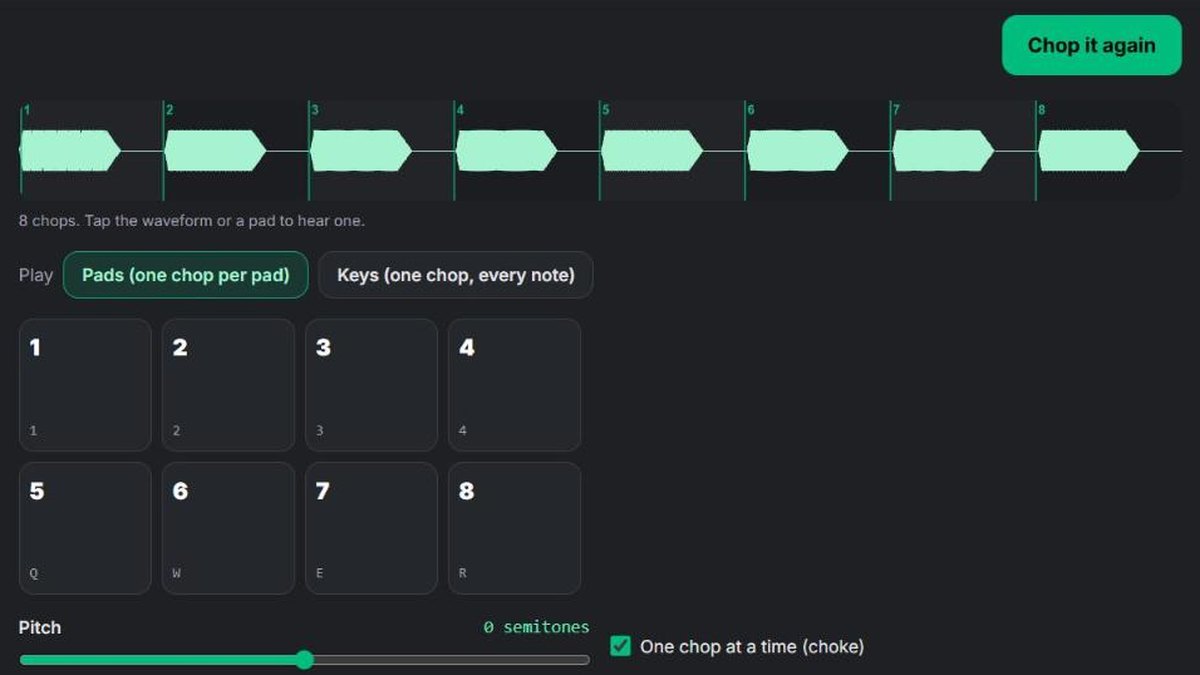
Vocal chops are short pieces cut from a vocal and replayed as a new rhythm or melody. In lo-fi, a single soft "ooh" or "ah", pitched up and down over the chords, can carry a whole track. Here's how to make them:
- Get a dry vocal you have the rights to: your own voice, a royalty-free acapella, or a song you made yourself. Only have a full song? Pull the vocal out with the Acapella Extractor.
- Open the Vocal Chop Maker, choose the vocal and press Chop it. It cuts the vocal into up to 16 chops where each new sound starts.
- Play the chops on the pads with your computer keyboard (1–4, Q–R, A–F, Z–V) or a MIDI keyboard.
- Switch to Keys mode to play one chop on every note, like a classic sampler (higher notes play faster and shorter). Play a simple melody that follows your chords.
- Record a take, or download the chops as a ZIP and arrange them in your DAW.
A quick but important note: don't chop famous songs you don't have permission to use. Uncleared samples are the most common reason beats get taken down from streaming services and YouTube. Using your own vocal, a licensed acapella or an original song you made with the AI song maker keeps your beat yours.
Step 6: Make it sound lo-fi (bit crush, tape, vinyl)
Now the texture. Lo-fi producers traditionally got this sound from old equipment: drum samplers that stored audio at low resolution, cassette decks, and records. You can recreate each of those ideas with effects, in this order:
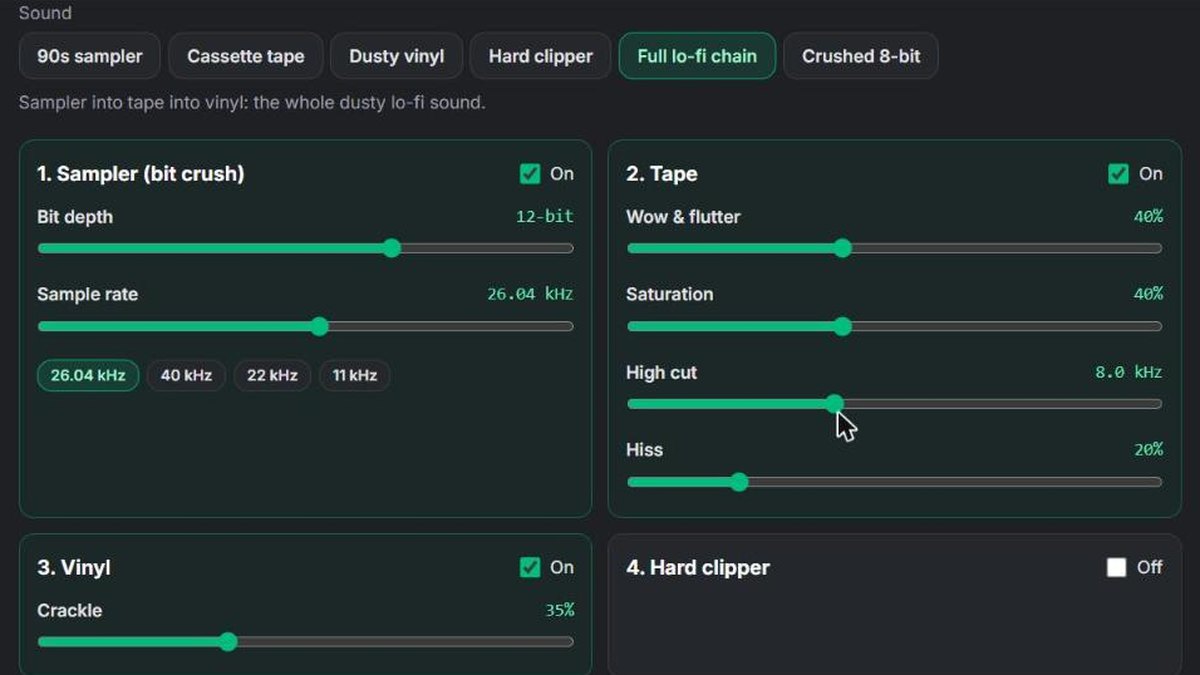
- Sampler grit (bit crushing). Lowering the bit depth and sample rate removes fine detail and adds a grainy crunch. Early drum samplers of the late 1980s stored sound at around 12 bits and 26–40 kHz (a CD is 16 bits at 44.1 kHz), and that missing detail is part of the classic boom-bap sound. 12-bit at about 26 kHz is a great starting point; 8-bit at 11 kHz is an obvious "crushed" effect.
- Tape. Add a slight wow and flutter (a slow pitch wobble), soft saturation for warmth, a high cut around 8–10 kHz to dull the top end, and a little hiss.
- Vinyl. A layer of crackle, kept quiet, sits under the whole track and makes it feel like an old record.
- Optional clipping. A hard clipper on the drums squares off the loudest peaks for a louder, punchier, crunchier loop.
You can do all of this in one place with the free Lo-Fi & Vintage Sampler Effect:
- Choose your beat, loop or bounced track (MP3, WAV, M4A, FLAC or a video).
- Pick a preset: 90s sampler, Cassette tape, Dusty vinyl, Hard clipper, Full lo-fi chain or Crushed 8-bit.
- Adjust each stage by ear, and use Mix to blend the original back in if it's too much.
- Press Make it lo-fi, listen, and download MP3 or WAV.
It runs in your browser, so your file is never uploaded. It uses the general recipes for old-gear sound (bit reduction, wow and flutter, saturation, crackle and clipping) and doesn't claim to copy any particular machine. In a DAW, a bitcrusher plus a tape or vinyl plugin does the same job.
Tip: apply the heaviest texture to the drums and the sample, and less to the bass. A bass that's too crushed loses its weight. Less is often more: 12-bit and a touch of wow already sound vintage.
Step 7: Bass, arrangement and mix
Bass. A soft, round bass that follows the root notes of your chords is enough. Keep it simple and slightly behind the beat. Low-pass it so it's felt more than heard.
Arrangement. Lo-fi tracks are short and loop-based, usually 2 to 3 minutes. Keep listeners interested with small changes:
- Intro (4–8 bars): chords alone, filtered, with crackle.
- Main loop (16 bars): drums and bass come in.
- Variation (8–16 bars): drop the kick, add the vocal chops or a second melody.
- Main loop again, then an outro that filters out or drops back to the chords.
Mix. Keep it soft. Roll off the harsh highs, compress gently, and resist making it loud: lo-fi isn't mastered to compete with pop. Check that the drums and chords sit together, and that the crackle is felt rather than distracting. For a finished, balanced file, the loudness meter shows whether you're near a streaming level (around -14 LUFS).
Can AI make a lo-fi beat for you?
Yes. If you want a full, original lo-fi track to listen to, post or chop, you can describe it in words and let AI produce it. With the SongUp AI AI Beat Maker or the lo-fi music generator, a prompt like "lo-fi hip-hop beat, dusty drums, mellow Rhodes chords, vinyl crackle, 80 BPM" gives you a complete instrumental.
Many producers use both: they generate an original track, then chop it in the Vocal Chop Maker, re-groove the drums and add their own texture. Because the track is original, there's no sample to clear.
Lo-fi beat checklist
Before you bounce your beat, check:
- Tempo between 70 and 90 BPM
- Swing on the hats (54–62%) and the snare slightly late
- Velocities that vary, so the hats breathe
- 7th or 9th chords, looping
- A melody or vocal chops you have the rights to
- Bit crush and tape on the drums and samples, not too much on the bass
- Quiet vinyl crackle under the whole track
- A soft mix with rolled-off highs
- Small changes every 8–16 bars
Frequently asked questions about making lo-fi beats
What BPM is lo-fi hip-hop?
Most lo-fi hip-hop is between 70 and 90 BPM, with 80–85 the most common head-nod tempo. Slower tracks around 60–70 BPM feel sleepy and late-night.
What do I need to make lo-fi beats?
A computer and headphones are enough. Any DAW works (FL Studio, Ableton Live, Logic Pro or free GarageBand), and you can do the drums, vocal chops and lo-fi texture with free browser tools such as the SongUp AI Drum Swing & Humanizer, Vocal Chop Maker and Lo-Fi Effect.
How do I make drums sound lo-fi?
Use soft drum sounds, add 54–62% swing and a slightly late snare, then run the drums through a bit crusher (about 12-bit, 26 kHz), a little tape saturation and a high cut. A hard clipper adds punch and crunch.
What swing should I use for lo-fi?
Start at 58–62% swing on 16th notes, which is the classic hip-hop drum-machine feel. Go lower (54%) for a lighter bounce, or add a lazy, behind-the-beat snare of 10–25 ms for a "drunk" feel.
What chords are used in lo-fi hip-hop?
Jazzy extended chords: major 7ths, minor 7ths and 9ths, often in ii–V–I or I–vi–ii–V progressions, played on electric piano, piano or guitar.
How do I add vinyl crackle to a beat?
Add a quiet vinyl noise layer under the track, or use a vinyl effect. The free SongUp AI Lo-Fi Effect has a vinyl stage with a crackle control; keep it low so it's felt, not distracting.
What is bit crushing?
Bit crushing lowers the bit depth and sample rate of audio. It removes fine detail and adds a grainy, crunchy texture, the sound of early digital samplers. 12-bit at around 26 kHz is the classic lo-fi setting.
Can I use samples from famous songs in lo-fi beats?
Only with permission. Uncleared samples can get your beat removed from Spotify, YouTube and other platforms. Use your own recordings, royalty-free samples, or an original song made with AI that you can chop freely.
Can I make lo-fi beats on my phone?
Yes. The SongUp AI free tools run in a phone browser too: you can program and swing drums, chop a vocal and add the lo-fi texture without installing an app. A computer is easier for arranging a full track.
How long should a lo-fi beat be?
Usually 2 to 3 minutes. Lo-fi is loop-based, so keep it short and change something small every 8 to 16 bars.
Is lo-fi hard to make?
It's one of the easiest genres to start with, because it's slow, simple and forgiving. The hard part is the feel: the swing, the late snare and a texture that's warm but not muddy. Those come with a few beats of practice.
The bottom line
A lo-fi hip-hop beat is a slow tempo, simple drums with real swing, jazzy chords, one catchy element, and a texture that sounds like old tape and vinyl. None of it needs expensive gear. Program and groove your drums in the Drum Swing & Humanizer, chop a vocal in the Vocal Chop Maker, and give the whole thing its dusty sound with the Lo-Fi Effect. All three are free with a free account, and your audio stays on your device.