
You don't need to buy a DAW, a sampler or a MIDI controller to start making beats. A modern browser can sequence drums, chop samples, add effects and export files your DAW can open later. This guide shows how to make a complete beat online for free, step by step, and what each free tool is good (and not so good) for.
We'll use the free browser tools we build at SongUp AI. They run on your own device, so your audio isn't uploaded, and they're free with a free account, with no limit and no watermark. Every technique here also works in FL Studio, Ableton Live, Logic Pro or GarageBand if you move to one later.
How to make a beat online for free, in short
- Drums: program a pattern and give it swing in the Drum Swing & Humanizer. Export MIDI or a WAV loop.
- Chords: find a progression in the Chord Progression Generator.
- Hook: chop a vocal you have the rights to in the Vocal Chop Maker and play a new melody on the pads.
- Texture: give the loop character with the Lo-Fi Effect (bit crush, tape, vinyl, clipper).
- Finish: join parts in the Audio Joiner, trim with the Audio Cutter and check loudness in the Loudness Meter.
Want a full instrumental in one step instead? Describe it to the AI Beat Maker.
What you need
- A computer or phone with Chrome, Edge, Safari or Firefox. A computer is easier for longer sessions.
- Headphones. Laptop and phone speakers hide bass and swing.
- A free SongUp AI account, so the tools' run buttons work.
- Optional: a MIDI keyboard or pad controller. In Chrome and Edge on a computer, the Vocal Chop Maker can be played from one through Web MIDI. Without one, the computer keyboard works.
Step 1: Program the drums (and make them groove)
Every beat starts with drums. Open the Drum Swing & Humanizer: it's a 16-step drum machine with kick, snare, clap, closed and open hi-hat.
- Start from a pattern: Boom-bap, Lo-fi, Trap or Neo-soul. Or press Empty and program your own. Tap a step once for a soft hit, twice for an accent, three times to clear it.
- Set the tempo: 70–90 BPM for hip-hop and lo-fi, 130–150 BPM for trap (programmed in half time), 120–125 BPM for house.
- Add swing. This is what makes programmed drums sound played. Start at 54% for a light bounce or 62% for classic hip-hop swing. The slider shows how many milliseconds late the off-beats play.
- Humanize: lay the snare a few milliseconds behind the beat, loosen the hats and vary the velocities. Press New human take for a fresh random variation.
- Export: a 4-bar MIDI file (to open in any DAW later) or an audio loop as WAV or MP3.
Why swing matters, with the exact numbers per tempo, is explained in what is swing in music.
Trap tip: trap is mostly straight (50–54% swing). Its groove comes from the hi-hat rhythm and the 808, not from swing. Keep the kick and snare simple and put the variety in the hats.
Step 2: Pick the chords
Chords set the mood. Open the Chord Progression Generator, choose a style (pop, sad, jazz, epic, lo-fi or blues) and a key, and listen. Roll a random one if you want ideas. Some reliable starting points:
| Style | Progression (in A minor / C major) | Works for |
|---|---|---|
| Dark trap | Am – F – Dm – E | Trap, drill, emotional rap |
| Lo-fi / jazzy | Dm9 – G13 – Cmaj9 | Lo-fi, chillhop, neo-soul |
| Pop | C – G – Am – F | Pop, upbeat beats |
| Emotional | Am – C – G – F | Melodic rap, R&B |
Note the key and the chords; you'll want the melody and chops to follow them. If you're building on a sample, find its key and BPM first with the Key & BPM Finder.
Step 3: Make a hook with vocal chops
A hook is the part people remember. In modern beats, it's often vocal chops: tiny pieces of a vocal replayed as a new rhythm or melody. You'll hear them in house, future bass, pop and hip-hop. Here's how to make them online:
- Get a vocal you're allowed to use: your own recording (the Voice Recorder works), a royalty-free acapella, or a song you made yourself. To pull a vocal out of a full song you own, use the Acapella Extractor.
- Open the Vocal Chop Maker and choose the file. MP3, WAV, M4A or even a video works.
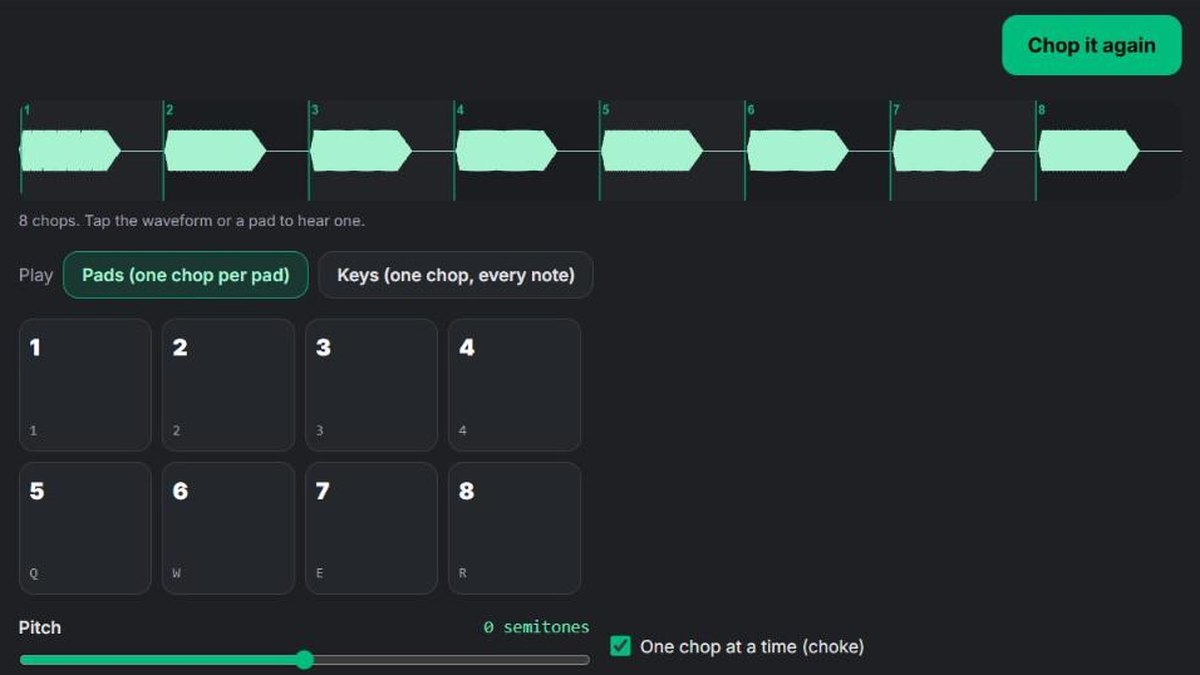
- Press Chop it. It finds where each new sound starts and cuts up to 16 chops. Raise Sensitivity for more, smaller chops, or cut into equal slices instead. You can nudge any chop's start and end.
- Play the pads. Each chop sits on a pad, played from the keys 1–4, Q–R, A–F and Z–V, by tapping the screen, or from a MIDI pad controller (notes 36–51). Keep One chop at a time on for the tight, stuttering sound.
- Switch to Keys mode to play one chop chromatically across the keyboard, the way a classic sampler pitches a sound: higher notes play faster and shorter. Play a melody that follows your chords. On a MIDI keyboard, middle C plays the chop at its own pitch.
- Record a take while you play, then download it. Or download single chops, or all chops as a ZIP (WAV or MP3) to arrange later.
Best chops: short vowel sounds ("ah", "oh", "ey") are the most musical. Breaths and consonants make good percussion.
About sampling famous songs: chopping someone else's recording without permission can get your beat taken down from YouTube, Spotify and other services, even if the chops are tiny. Stick to vocals you own or have licensed, or make an original song with the AI song maker and chop that. Everything in it is yours to use.
Step 4: Give the beat a texture
Clean digital loops often sound thin next to records. A texture pass gives them character. The free Lo-Fi & Vintage Sampler Effect runs your loop through four stages you can switch on and off:
| Stage | What it does | Use it for |
|---|---|---|
| Sampler | Lowers the bit depth and sample rate (for example 12-bit, 26 kHz) | Gritty, boom-bap drums and samples |
| Tape | Wow and flutter, saturation, high cut, hiss | Warm, wobbly melodies and chords |
| Vinyl | Crackle and an old-record tone | Lo-fi and soul-sample beats |
| Hard clipper | Squares off the loudest peaks | Louder, punchier drums |
Start from a preset (90s sampler, Cassette tape, Dusty vinyl, Hard clipper, Full lo-fi chain or Crushed 8-bit), adjust by ear, and use Mix to blend back some of the original. Then download MP3 or WAV. The presets are general recipes for the sound of old equipment, not copies of any one machine.
Going for lo-fi specifically? The full walkthrough is in how to make lo-fi hip-hop beats.
Step 5: Put it together and finish it
Without a DAW, you can still build a full track out of loops:
- Make your sections as audio: an intro loop (chords only), a main loop (drums, chords and chops) and a break (no kick, chops only).
- Join them in order with the Audio Joiner: intro, main, break, main, outro.
- Trim and fade with the Audio Cutter.
- Check the level in the Loudness Meter. It compares your track with what Spotify, YouTube, Apple Music and Tidal play at.
- Change the vibe if you like: slow it down with Slowed + Reverb, or move it to a new key with the Pitch Changer.
When you're ready for a DAW, everything carries over: the MIDI drums open as a pattern, and the chops ZIP becomes a sample folder.
Or let AI make the whole beat
If you want a finished, original instrumental right away, describe it: "dark trap beat, 140 BPM, 808 glides, eerie piano, sparse hi-hat rolls" or "chill lo-fi hip-hop beat, dusty drums, mellow Rhodes, vinyl crackle". The SongUp AI AI Beat Maker turns that prompt into a full track.
Producers often combine the two approaches: generate an original track, then chop it, re-groove its drums and add texture with the free tools. Since the track is original, there's no sample to clear.
Free online beat tools compared
| What you want to do | Free SongUp AI tool | In a DAW |
|---|---|---|
| Program drums with swing | Drum Swing & Humanizer | FL Studio channel rack, Ableton drum rack |
| Swing an existing MIDI file | Drum Swing & Humanizer (upload .mid) | Quantize with swing, groove templates |
| Chop a vocal or sample | Vocal Chop Maker | Ableton Simpler (slice), FL Studio Slicex |
| Make it sound vintage | Lo-Fi Effect | Bitcrusher, tape and vinyl plugins |
| Find chords | Chord Progression Generator | Chord tracks, chord plugins |
| Find a sample's key and tempo | Key & BPM Finder | Built-in tempo/key detection |
| Pull out a vocal | Acapella Extractor | Stem separation plugins |
| A full beat from a description | AI Beat Maker | – |
What browser tools don't do (yet): a full timeline with many tracks, automation and mixing per track. For that you'll eventually want a DAW (GarageBand is free on Mac and iPhone; FL Studio, Ableton Live and others have trial versions). The browser is perfect for ideas, sketches, learning and quick loops.
Frequently asked questions about making beats online
Can I make beats online for free?
Yes. You can program drums, chop vocals, add effects and export MIDI, WAV or MP3 for free in your browser. The SongUp AI tools are free with a free account, with no limit and no watermark.
Do I need to download anything to make beats?
No. The SongUp AI beat tools run in the browser on your own device, so there's nothing to install and your audio isn't uploaded to a server.
What is the best free beat maker online?
It depends on the job. For drums with real swing, the SongUp AI Drum Swing & Humanizer; for chopping vocals, the Vocal Chop Maker; for vintage texture, the Lo-Fi Effect; for a complete instrumental from a prompt, an AI beat maker. For full multitrack arranging, a free DAW such as GarageBand.
Can I make beats on my phone?
Yes. The tools work in a phone browser, and the drum grid, chops and effects all work with touch. For long arranging sessions a computer is more comfortable.
Can I use a MIDI keyboard in the browser?
Yes, in browsers that support Web MIDI: Chrome and Edge on a computer. The Vocal Chop Maker plays pads 1–16 from MIDI notes 36–51 in Pads mode, and plays one chop on every note in Keys mode.
Can I export my beat to FL Studio or Ableton?
Yes. Download the drums as a MIDI file and the chops as a ZIP of WAV files, then drag them into FL Studio, Ableton Live, Logic Pro or any other DAW.
Can I sell beats I make with these tools?
The tools themselves don't put any restriction on your output. What matters is your source material: drums programmed in the tool and vocals you recorded yourself are yours. Samples from other people's songs need permission before you sell or release anything.
Is it legal to chop vocals from a song?
Only with permission from the rights holders. Chopping your own vocals, licensed acapellas or an original song you made is fine; chopping a commercial song without clearance can lead to takedowns or claims.
What BPM should my beat be?
Common ranges: lo-fi and boom-bap 70–90 BPM, R&B 60–80, trap 130–150 (felt in half time), drill 140–145, house 120–125, pop 100–130.
How do I make my drums sound less robotic?
Add swing (54–62% for hip-hop), put the snare slightly behind the beat, and vary the velocity of every hit. The Drum Swing & Humanizer does all three and shows the timing in milliseconds.
The bottom line
You can make a full beat online for free: program and swing the drums in the Drum Swing & Humanizer, find chords, build a hook in the Vocal Chop Maker, give it character with the Lo-Fi Effect, and join the parts into a track. Everything runs in your browser, and the MIDI and WAV files open in any DAW when you're ready to go further.