

Most songs start as a tune stuck in someone's head. Maybe you hummed it in the car, whistled it in the shower or saved it as a 15-second voice memo you never opened again. Until recently, turning that into a real song meant learning an instrument, working out the notes and chords, and building an arrangement in a DAW. This guide shows the faster way: hum the melody, let AI write down the notes, and hear your tune played over a full band a few minutes later.
We build SongUp, so the walkthrough uses our Hum to Song tool. The recording tips, the limits and the manual method near the end apply to any tool.
In short
- Record 5 to 20 seconds of one clear melody. Humming, whistling and singing "da da da" all work.
- Check what the AI heard (key, tempo, notes and chords) before you spend anything. That check is free on SongUp.
- Pick how your tune should be played: on an instrument, in your own voice, or as the hook of a song with an AI singer.
- A band records a backing in your key and tempo, and your melody is placed on its chords. Your tune is really in the song, not "inspired by" it.
Hum to song vs. hum to search
People search for "hum a song" for two different reasons, so it's worth separating them first.
| You want to… | What it's called | Tools |
|---|---|---|
| Find the name of a song that already exists | Hum to search | Google's "Search a song" in the Google app, SoundHound |
| Turn a melody you made up into a new song | Hum to song | SongUp Hum to Song, or a DAW plus audio-to-MIDI (below) |
Hum-to-search tools compare your hum against a database of released songs. A hum-to-song tool does the opposite: it treats your hum as the start of something new and builds music around it. The rest of this guide is about the second one.
How AI turns a hum into a song
It helps to know what happens under the hood, because it explains the recording tips that follow. On SongUp there are four stages:
- Listening. A pitch-detection model runs in your browser and writes down every note you hummed: its pitch, when it starts and how long it lasts. Your recording isn't uploaded for this step.
- Writing a lead sheet. The notes are cleaned up into something a band can play. That means finding the tempo from the gaps between notes, working out the key from which notes you used most, gently snapping slightly off notes into the key and onto the beat, and choosing one chord per bar that fits your melody.
- Recording the band. SongUp's AI music engine records a backing track in your key and tempo, in the style you picked, with an intro, a main section and an ending.
- Putting your melody on top. Back in your browser, the finished backing is measured: its real tempo, its real key and the bar where the drums and bass come in. Your melody is then moved to match, lined up with the band's chord loop and mixed on top. Only notes that would clash with the band's chords by a semitone are adjusted.
That last step is what makes the result follow your tune. Music models are good at style and sound, but they don't reliably copy a melody you give them. So instead of hoping the band plays your tune, SongUp plays your tune for you, over a band that was asked to fit it.
Step 1: Record a hum the AI can read
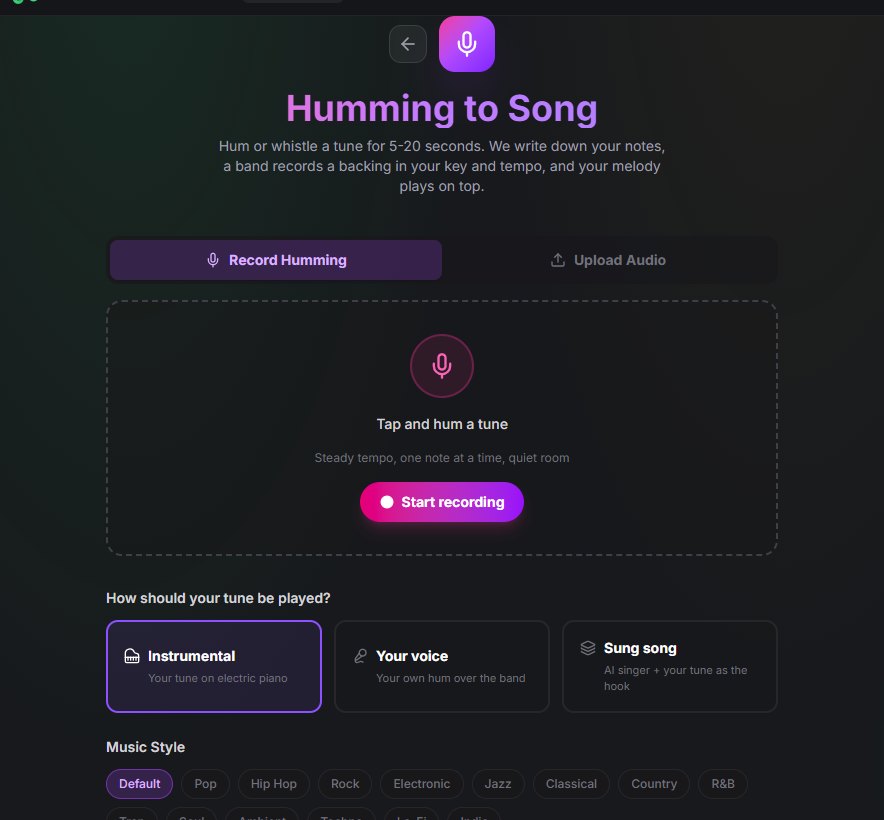
Open Hum to Song and press Start recording, or switch to Upload Audio if the tune is already on your phone. The recorder stops by itself at 30 seconds, but 5 to 20 seconds is the sweet spot: long enough for a full phrase, short enough to stay steady.
What makes a recording easy to read:
- One note at a time. Pitch detection follows a single melody line. Chords on a guitar or piano, or a second voice, confuse it.
- Clear note starts. A closed-mouth "mmm" hum slides between notes. Singing "da", "doo" or "la" on every note, or whistling, gives each note a clear beginning, and that's what the tempo is measured from.
- A steady tempo. Tap your foot or nod along. Rushing the second half makes the tempo guess worse.
- A quiet room, close to the mic. Fans, TVs and other people talking all show up as stray notes. Phone voice memos work well if you hold the phone about a hand's width from your mouth.
- The catchy part only. The hook or chorus melody works best. The band repeats and develops it, so you don't need to hum a whole song.
Step 2: Check what the AI heard (free)
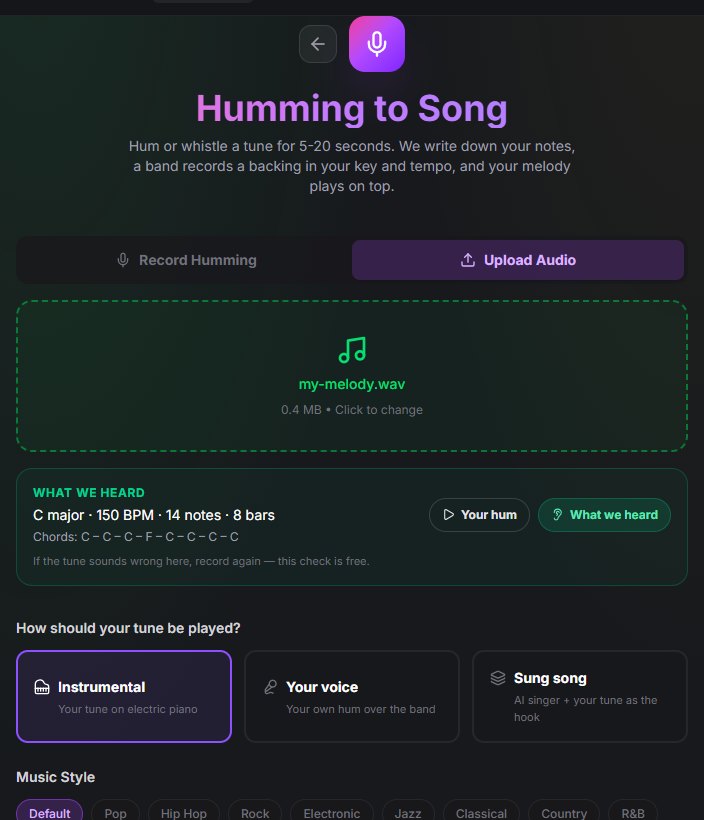
A few seconds after recording, the What we heard panel shows the key, tempo, number of notes and bars, and the chord for each bar. Press What we heard to hear your tune played back cleanly, then Your hum to compare.
This is the most important step in the whole process, and it doesn't cost anything. If the playback isn't your tune, the song won't be either, so record again. The usual problems:
- Wrong notes: background noise or a slide between notes. Record somewhere quieter, singing "da" on each note.
- A tempo far from what you meant: record again, tapping your foot so the pulse stays steady.
- Too few notes, or "we couldn't hear a clear melody": hum a little louder, closer to the mic, for at least 5 seconds.
Step 3: Choose how your tune is played
There are three ways to hear your melody in the finished song:
| Mode | What you hear | Best for |
|---|---|---|
| Instrumental | Your tune on a lead instrument over the band | Hooks, beats, background music, trying out an idea |
| Your voice | Your own recording over the band | Hearing yourself as the singer |
| Sung song | An AI singer sings your lyrics over your chords, and your exact tune plays in the intro, the bridge and the outro | A complete song with words |
A few details worth knowing:
- In Instrumental mode, the lead instrument follows the style. Pop, jazz, soul and R&B get an electric piano. Hip hop and trap get a bell lead, electronic and techno a synth lead, rock, indie and country a plucked guitar, classical and ambient a soft flute, and lo-fi gets lo-fi keys.
- Your voice uses your recording exactly as it is, so it works best when you hummed in tune and in time. If the band can't be placed in your key and tempo, your tune is played on the lead instrument instead, so you still get a usable song.
- Sung song needs lyrics. Write your own, or press Write Lyrics for a first draft you can edit. The AI singer writes its own vocal line over your chords. If you need the singer to sing your exact melody, use Your voice or Instrumental. If you're writing your own words, our lyrics to song guide covers line lengths and structure.
Step 4: Pick a style and make the song
Choose one of 15 styles: Default, Pop, Hip Hop, Rock, Electronic, Jazz, Classical, Country, R&B, Trap, Soul, Ambient, Techno, Lo-Fi or Indie. Then press Turn my hum into a song.
Two things happen next:
- The band records. This takes a few minutes. You can leave the page: SongUp lets you know when the band is done, and brings you back to finish the song.
- Your melody is added. This runs on your device and takes about a minute, so keep the tab open. You'll see the steps: fetching the band's recording, finding the beat and the key, playing your melody over the band, and saving the song.
If you closed the tab before the second part, the song waits in your Library with an Add your melody button.
Step 5: Compare, download and keep going
When the song is ready, switch between Song and Your hum to hear how far your idea came, then download the finished mix. It's also saved in your Library.
Where to go from there:
- Try another style. The same hum as lo-fi and as rock can feel like two different songs.
- Record vocals over it. Load the song into the Recording Studio as a backing track and sing your own words over the band.
- Take it apart. The Stem Separator splits the song into vocals, drums, bass and other parts for remixing or editing in a DAW.
- Finish it properly. Our guide on how to make a song with AI covers editing, mastering and releasing.
What Hum to Song costs
Checking what the AI heard is free and happens in your browser. Making the song uses 55,000 credits from a Pro plan, the same as any other song composed from scratch on SongUp. Pro is $9.99 a month, or $7.99 a month billed yearly, and includes about 40 songs a month and commercial rights. Free plan credits only cover instant songs on the Create page.
If the band fails to record, the credits go back to your account automatically. If the band finishes but adding your melody fails, retrying doesn't charge you again. See current pricing for every plan.
Honest limits
No hum-to-song tool is magic. These are the edges you might hit with SongUp:
- One melody line. It doesn't separate a melody from chords or from a second voice.
- Notes are tidied up. Slightly flat notes are moved into the key and timing is snapped to the beat. That's usually what you want, but deliberate blue notes or loose, rubato phrasing are straightened out.
- The band is its own musician. It's asked for your key, tempo and chords, but it sometimes chooses its own. SongUp measures what the band actually played and moves your melody to fit, which is why the key in the finished song can differ from the one in the What we heard panel.
- In Sung song mode, the singer writes its own melody. Your exact tune is heard in the intro, the bridge and the outro, not in every sung line.
- Rhythm-only ideas don't work. A beatboxed drum pattern has no melody to follow. Describe it as a prompt on the song generator instead.
The manual way: a DAW and audio-to-MIDI
If you'd rather build everything yourself, the traditional route still works:
- Record your hum and turn it into MIDI notes with an audio-to-MIDI converter. The same recording tips apply: one note at a time, clear note starts, a quiet room.
- Import the MIDI into a DAW such as GarageBand, FL Studio or Ableton Live, and fix wrong notes in the piano roll.
- Work out the chords under your melody. The Chord Recognition tool helps if you play the tune on an instrument.
- Program drums, a bass line and chords, then mix and master.
This gives you complete control, and it teaches you a lot about how songs are built. Expect hours rather than minutes. Many songwriters use both: Hum to Song to hear whether an idea is worth it, then a DAW for the ones they keep.
Frequently asked questions
Can AI turn my humming into a song?
Yes. A hum-to-song tool detects the notes you hummed, works out the key, tempo and chords, and builds a full arrangement around them. On SongUp your melody is played in the finished song, either on an instrument or in your own voice, over a band recorded in your key and tempo.
Is Hum to Song free?
Recording your hum and checking what the AI heard is free. Making the full song uses Pro credits: 55,000 per song, about the same as any song composed from scratch. Pro starts at $7.99 a month billed yearly.
How long should my hum be?
5 to 20 seconds. That's enough for a hook or a chorus, and short enough to keep the tempo steady. The recorder stops at 30 seconds, and uploaded files can be up to 7 MB.
Can I whistle or sing instead of humming?
Yes, and it often works better. Whistling is a very clean tone, and singing "da" or "la" on each note gives clear note starts. Words are fine too, but the tool only uses your notes, not the words.
Will the song be in my key?
The band is asked to play in your key and tempo. Music models don't always follow that exactly, so SongUp measures the backing it gets back and moves your melody to match. The finished song can end up a few semitones higher or lower than you hummed, but the tune and the harmony stay together.
Can I use the song commercially?
Songs made on a Pro plan come with commercial rights. The melody you hummed is your own creative work, which also matters for copyright. Our AI music copyright guide covers the US and EU rules in detail.
Does it work on my phone?
Yes. Hum to Song runs in the mobile browser, and you can also install SongUp as an app. For the best results, record somewhere quiet, holding the phone about a hand's width from your mouth.
Got a tune in your head right now? Open Hum to Song, hum it for 15 seconds, and hear what the AI picked up before you spend a single credit.