A coworker is leaving: a new job, a move, maternity leave or the last day before retirement. The card is signed and the cake is ordered, but you want something people will actually remember from the leaving do. A short song with their name, their habits and the in-jokes from the office does that. On SongUp AI you write or paste the words, describe the sound (pub singalong, upbeat pop, a country ballad, a big musical finale) and an AI voice sings them over a newly composed melody. In the United States and the United Kingdom the first song with your own lyrics is free, and it is the whole song, not a 30-second sample.
This guide shows the steps, how to write farewell lyrics that are funny without going too far, which styles suit an office send-off, and what is free and what is not. We make SongUp AI, so this page also says where the free account ends. Everything about our own product was checked in the code on November 13, 2026.
In short
- Your words, sung free: a free account can have its own lyrics sung once. In the US, UK, Canada, Australia, Ireland and New Zealand that is the whole song. If the day's whole free songs are used up, you get a 30-second clip from the chorus.
- Listening is free. To download the MP3, share the song and make more songs you need a paid plan.
- Written by the team. Collect one line from everyone and the song becomes the group's card.
- Any style: pub singalong, eighties-style pop, country, a musical-theatre finale, a slow thank-you ballad.
- Your words stay your words. The AI writes the melody and the music. It does not rewrite lyrics you paste.
Hear your farewell song sung, free
What a free account gets
| Free account | Paid plan |
|---|
| Your own lyrics, sung | once per account and per device; the whole song in the US and UK, 30 seconds if the day's number is used up | in every song |
| Ready songs from our library | 3 right away, one time, picked to match your idea | not needed: songs are composed from scratch |
| New song from your description | no (except the free song above) | a fixed number each month, by plan |
| MP3 download | no, listening in the app only | yes |
| Commercial use (Spotify, monetized YouTube, selling the song) | no | yes |
Current prices are on the pricing page. They differ by country, so this page gives no figures. If you want one song and no monthly bill, read AI song generators with no subscription.
Step by step: from a group chat to a song
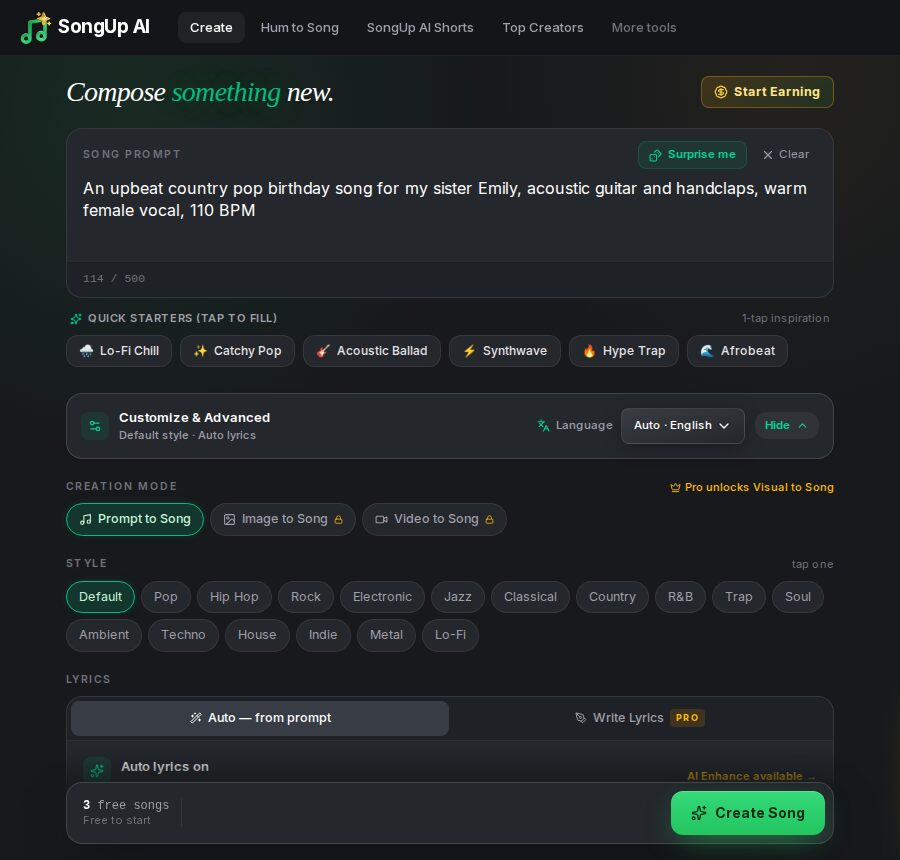
- Collect the material. A week before the last day, ask the team in the group chat for one memory, one habit and one thing they will miss. You will not use it all.
- Make a free account. At songupai.com/create you sign up with email or a Google account. No credit card is needed.
- Describe the sound. For example: "upbeat feel-good pop singalong for an office leaving party, handclaps, bright guitars, cheerful group vocals on the chorus".
- Paste your lyrics. Under "Customize & Advanced", in the lyrics section, choose your own lyrics ("Custom lyrics") and paste them. Put
[Verse] above a verse and [Chorus] above the chorus. For the free song the lyrics can be 20 to 2,400 characters.
- Press "Create Song". With a free account a window opens where you have exactly these lyrics sung, once, free. In the US and UK the button also says what you get: the whole song.
- Play it at the send-off. From a phone into a speaker is enough. Singing takes a little while, so make the song the day before, not five minutes before the speech.
The limits, stated plainly: the free song is once per account and once per device. The number of whole free songs each day is limited. When it is reached, the AI sings a 30-second clip from the chorus. If a song fails, it is not counted and you can try again.
How to write a farewell song people will sing along to
- Name in the chorus, stories in the verses. The chorus is the part the room joins in on, so keep it short and put the name there.
- Specific beats clever. "The mug that says World's Okayest Boss", "the three-minute standup that took forty", "the only one who knew how the printer worked". Real details get the laughs.
- Tease the job, not the person. Jokes about meetings, spreadsheets and the coffee machine land with everyone. Jokes about someone's looks, age, health or private life do not belong in a song played at work.
- End warm. The last chorus or a short bridge should say thank you plainly. That is the line people quote in the card.
- Check it with one person who knows them well. Something that is funny in the group chat can sting when sung out loud.
- Keep lines the same length. Lines sung to the same melody need about the same number of syllables. Read them aloud and clap the beat.
- Write numbers and names as they sound. "Twenty-three years", not "23 yrs". Spell an unusual name phonetically if the voice stumbles.
Here is how it looks when pasted (written by us, you can use it and change the details):
[Verse]
Nine years at the corner desk, you never missed a Monday,
you fixed the printer with a pen and saved the deck on Sunday,
you learned the names of every new kid by the second meeting,
and somehow every spreadsheet that you touched stopped bleeding.

[Chorus]
So here's to you, Priya, the best we ever had,
the calm in every deadline, the reason it's not bad,
we'll keep your plant alive, we'll keep your chair the same,
and every time it all goes right, we'll say your name.

[Bridge]
Go on, go on, the new place won't know what hit them,
go on, go on, and tell them that we sent you.
Which styles suit an office send-off?
| Style | Example prompt |
|---|
| Pub singalong (UK leaving do) | Rousing pub singalong with acoustic guitar, stomps and a crowd chorus, cheerful male vocal |
| Feel-good pop | Upbeat feel-good pop with handclaps and bright guitars, group vocals on the chorus |
| Eighties pop | Eighties synth-pop with big drums and a catchy hook, energetic female vocal |
| Musical-theatre finale | Big Broadway-style finale with piano and brass, theatrical vocal, key change at the end |
| Country | Upbeat country with fiddle and acoustic guitar, warm male vocal, story-telling verses |
| Thank-you ballad | Warm piano ballad, heartfelt female vocal, slow build, simple and sincere |
| Rap tribute | Playful hip-hop beat with a fun flow and a sung hook, clean lyrics |
For someone retiring after a long career, see retirement songs. For a tribute in the form of a funny roast, keep it kind; there is more on that style in how to make a diss track.
Ways teams use the song
- At the leaving do or the last team call. Play it after the speech, or share the screen on a video call so remote colleagues hear it at the same moment.
- In the card. With a paid plan you can download the MP3 or send a link, and put a QR code to it in the card.
- As a lyric video. The Lyric Video Maker puts the words on screen in time with the music, so the room can sing the chorus. Free with a watermark in 720p; with a plan or the 7-day pass, no watermark and Full HD.
- For a team that is not leaving. The same steps work for a work anniversary, a promotion, a team win or a holiday party.
No lyrics yet? Get a draft
If you have the stories but not the lines, the AI Lyrics Generator writes a full draft. Describe the song in a sentence ("funny farewell song for Priya, our team lead leaving after nine years, she fixed the printer and ran every standup"), choose the mood and the structure. "Hear it sung with AI" sends the lyrics to the studio. A free account can make 15 drafts or rewrites a day. For this your description is sent to our server and to an outside AI language model, so leave out anything private about your colleague or your company.
Rights and two things to avoid
The words you wrote are yours. Songs from a free account are for non-commercial use, such as playing at a leaving party. With a paid plan you get commercial-use rights. More in AI music and commercial use.
Do not paste the lyrics of a famous song with the name swapped in: the words still belong to their writers. And new words to a well-known tune need the publisher's permission before they are shared publicly. Your own words on a new melody composed by the AI do not have that problem. Also leave out company names, client names and anything confidential if the song may be posted online.
Frequently asked questions (FAQ)
Can AI write a farewell song for a coworker?
Yes. On SongUp AI you write words with your coworker's name and stories, describe a style, and an AI voice sings them over a new melody. If you have no words yet, the free Lyrics Generator writes a draft. A free account can have its own lyrics sung once.
Is it free?
A free SongUp AI account can have its own lyrics sung once. In the US, UK, Canada, Australia, Ireland and New Zealand that is the whole song while the day's whole free songs last; after that it is a 30-second clip. Listening is free. Downloading, sharing and making more songs need a paid plan.
How long does it take?
Writing the words takes most of the time. Singing the song takes a few minutes. Make it the day before the leaving do so there is time to fix a name that comes out wrong.
Can the whole team write it together?
Yes. Collect one line or memory from each person, then shape them into verses. One person pastes the final lyrics into SongUp AI.
What should a farewell song not include?
Anything about a person's looks, age, health or private life, and anything confidential about the company or clients. Tease the job, not the person, and end with a sincere thank-you.
Can we play it on a video call?
Yes. Share your screen or your computer's sound on the call and play the song from the SongUp AI app.
Will the AI change my lyrics?
No. Lyrics you paste are sung as written. If a word is sung oddly, spell it the way it sounds, write numbers out as words, and try again.

