If you clicked "Commercial license with Pro" on our home page, here is the short answer. Every song you make on a paid SongUp AI plan, or buy on its own for $2.99, is assigned to you: you own its copyright and may use it commercially anywhere, with no royalties owed to us and no credit required. Each of those songs also comes with a certificate of ownership, a one-page PDF with a number that anyone (a client, a distributor, a YouTube claimant) can check at songupai.com/verify.
This guide explains exactly what that license covers, what is printed on the certificate, how we decide which songs get one, how anyone can check a song in ten seconds, and why all of this matters so much once your song leaves your laptop and lands on YouTube, Spotify, TikTok or a client's ad. Everything below is taken from our own Terms of Service (section 3), the SongUp AI Song License and the code that issues and checks certificates, so you can rely on the details.
This article is general information, not legal advice. Platform rules and copyright law change, and if a release, a contract or a dispute depends on it, talk to a lawyer who works in music or intellectual property.
In short
- Paid songs are yours. Songs made on Lite, Pro, Pro Plus, Elite or Ultra, and songs bought one at a time, are assigned to you with full commercial rights. Stream them, monetize them, put them in ads, games, films and podcasts. No royalties, no credit line.
- Free songs are not. A free account is matched to a finished song from a shared library. Those songs are for personal, non-commercial use, public use must credit SongUp AI, and they never get a certificate.
- The certificate is proof you can hand over. It shows the song title, your name, the date the song was made and a certificate number. The number opens a live check at songupai.com/verify that shows the song is owned, with commercial rights.
- The date matters, not today's plan. Rights follow the plan you were on when the song was made. Cancel later and the songs you made while paying stay yours.
- A license is not the whole story. Platforms add their own AI rules (disclosure, no impersonation, no spam), and copyright law protects human contributions most strongly. We cover both below.
See the plans that include the license
What "commercial license with Pro" means, in plain English
Section 3 of our Terms is called "Commercial Licensing & IP Ownership". Its key sentence for paid plans says that on generation, SongUp AI "assigns you full copyright ownership and commercial monetization rights". The separate Song License PDF spells out what that lets you do:
- Release the song on streaming services such as Spotify, Apple Music and YouTube Music, and keep the earnings.
- Use it in your work: videos, podcasts, games, apps, adverts, films and broadcasts, worldwide.
- Sell, license, loop, edit and remix it, including licensing it on to someone else.
- Do all of that without paying royalties to SongUp AI and without crediting us.
Three details are worth reading twice.
It is an assignment, not just a permission. Many tools give you a license to use their output while they keep the rights. Our terms go further for paid songs: whatever rights SongUp AI holds in the song are assigned to you. That is why the certificate says the song "belongs to" you, and why the verify page labels a paid song "Verified: owned, with commercial rights".
"With Pro" is shorthand. The home page says Pro because Pro is the plan most people choose. The terms list every paid plan: Lite (sold only in some countries), Pro, Pro Plus, Elite and Ultra, plus any song bought on its own as a one-time purchase. Our FAQ names Lite, Pro and Pro Plus because those are the plans on sale to most visitors today; the terms are the full list. (Our API page mentions Pro and higher for songs made through the API.)
It applies song by song, at the moment the song is made. The terms say the rights apply "provided your subscription was active and in good standing at creation". A song made while you were on Pro stays yours after you cancel. A song made on a free account stays a free song even if you upgrade the next day: make it again on the paid plan instead.
From the SongUp AI Song License, section 2
Each such song comes with a certificate of ownership bearing a number that anyone can check at songupai.com/verify.
Free vs paid: what each option lets you do
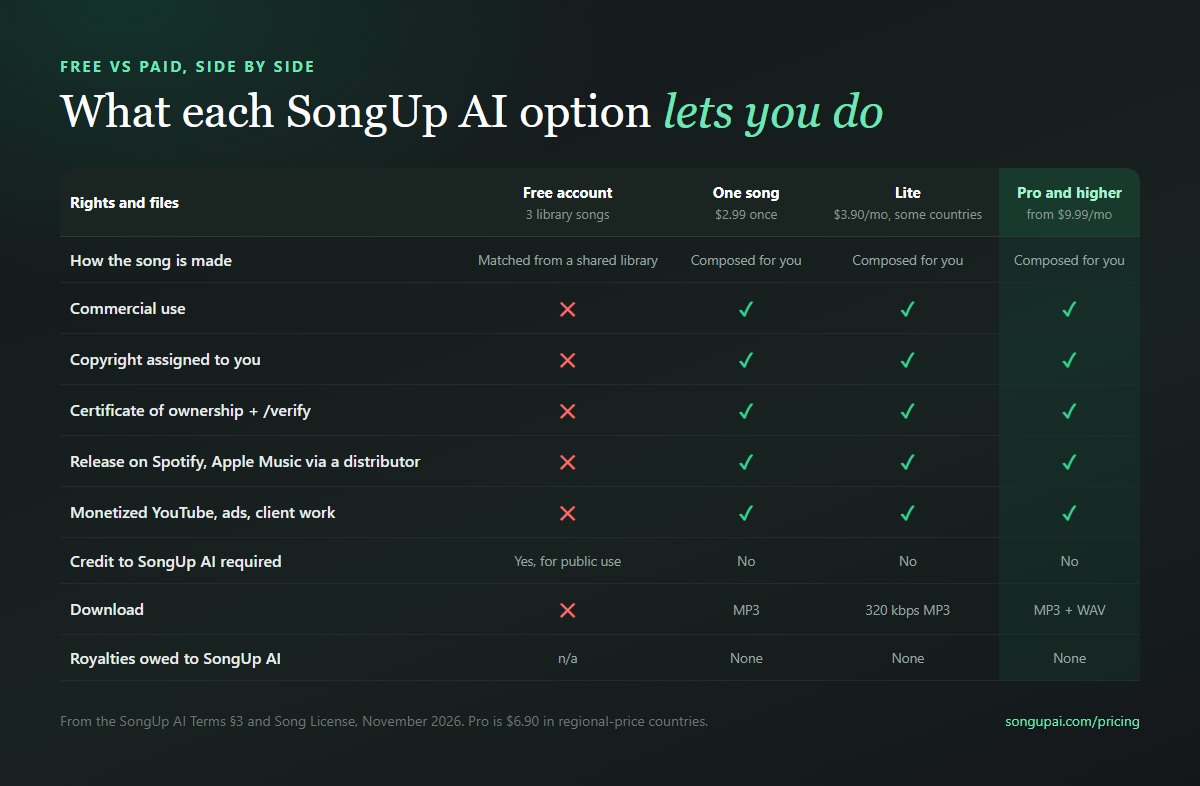
| Free account | One song, $2.99 once | Lite, $3.90/month (some countries) | Pro, from $9.99/month, and higher |
|---|
| How the song is made | Matched from a shared library of finished songs | Composed for you from your words | Composed for you, 8 songs a month | Composed for you, 21 songs a month on Pro, 45 on Pro Plus |
| Commercial use | No: personal, non-commercial only | Yes | Yes | Yes |
| Copyright | Not assigned | Assigned to you | Assigned to you | Assigned to you |
| Certificate of ownership | No | Yes | Yes | Yes |
| Credit to SongUp AI | Required for public use | Not required | Not required | Not required |
| Download | Not available | MP3 | 320 kbps MP3 | MP3 and WAV |
| Royalties to SongUp AI | Not applicable | None | None | None |
Prices are in US dollars. In regional-price countries Pro is $6.90 a month and one song is $1.99. Pro's first month is currently $1 for 5 songs for accounts that have never subscribed. Full details on pricing.
Why free songs don't get a license or a certificate
This is the part most AI music sites skip, so we'll be direct about it.
A free SongUp AI account doesn't compose a new song. It matches your idea to a finished song from our shared library, called Instant Match, in about 10 seconds. That library is shared: the same recording can be matched to many accounts. The terms also say that a song generated on a free account may be added to that library and served to other users (only the audio; your prompt, lyrics, title and account are never shown, and a song whose prompt names a person is never added).
So a free song can't honestly be called "yours" in the way a commercial license needs:
- Two people could hold the same audio. If both uploaded it to a distributor, both would be claiming the same recording.
- It could never qualify for YouTube Content ID. YouTube requires that "you must have exclusive rights to the material in the reference file" and lists "content licensed non-exclusively from a third party" as not eligible.
- It would make the certificate meaningless. A certificate is only worth something if it's only issued for songs that really belong to one person.
That's also why paid songs are never added to the library: the terms say songs created on a paid plan "are yours and are never added to the library".
Here is what library songs sound like. Every song in the library has a player you can embed, and these two are good examples of the quality:
Good to know
Library songs are free to listen to and to embed with credit on a blog or website. They are not licensed for monetized videos, releases or client work. For that, make your own song on a paid plan: it is composed from your words, nobody else gets the same audio, and it comes with a certificate.
You can browse the library on AI songs and copy any player from embed songs.
The certificate, line by line
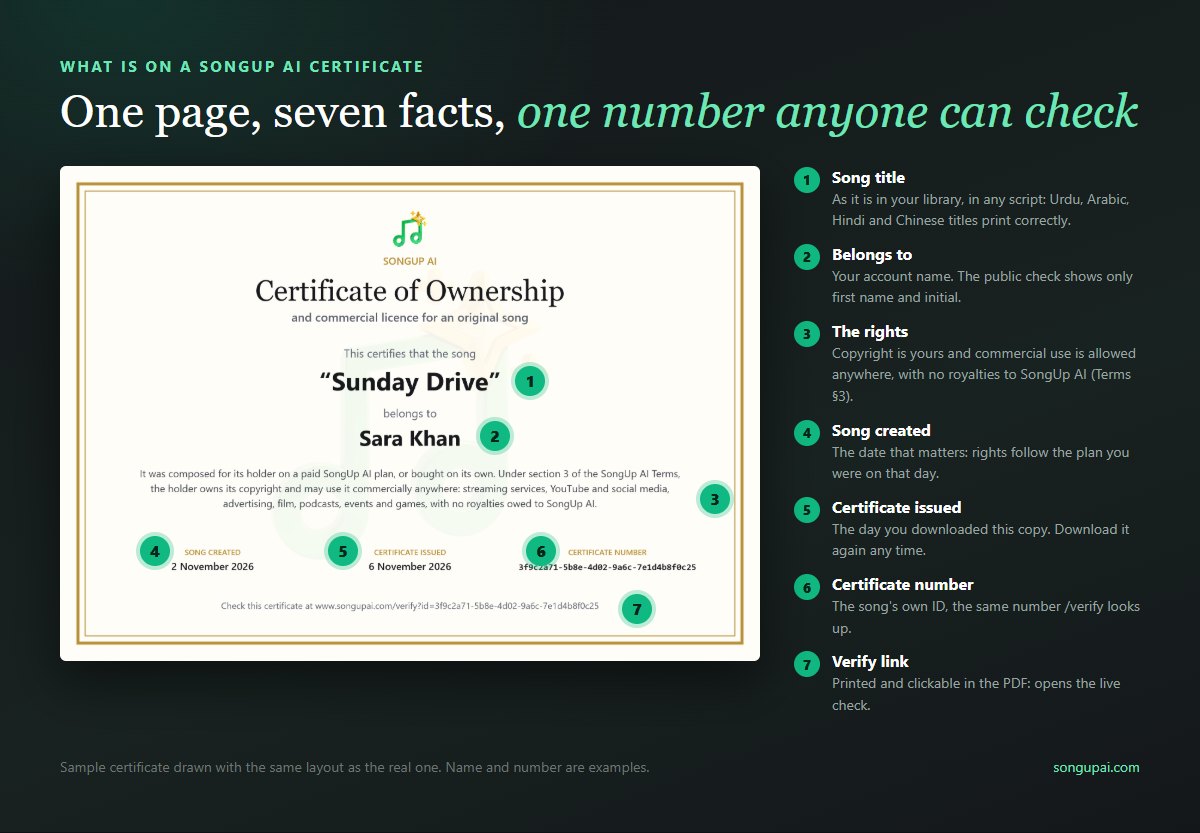
The certificate is a one-page A4 landscape PDF with a gold double border, the SongUp AI logo at the top and a faint watermark of the logo behind the text. The sample above uses the same layout as the real one; the song, name and number are examples. Here's what each part means and why it's there.
- "Certificate of Ownership and commercial licence for an original song". The title says both things at once: the song belongs to you, and you may use it commercially.
- The song title, exactly as it is in your library. Titles print correctly in any script, including Urdu, Arabic, Hindi and Chinese. (We draw the page in your browser for this reason: the standard PDF fonts can't write those scripts.) Right-to-left titles print without English quotation marks, so they don't come out mirrored.
- "Belongs to" and your account name. If the name is very long, it shrinks to fit rather than being cut.
- The rights statement. It says the song "was composed for its holder on a paid SongUp AI plan, or bought on its own", that under section 3 of the Terms the holder "owns its copyright and may use it commercially anywhere: streaming services, YouTube and social media, advertising, film, podcasts, events and games, with no royalties owed to SongUp AI."
- Song created. The date the song was made. This is the date that decides your rights, because the license depends on your plan at that moment.
- Certificate issued. The day you downloaded this copy. You can download it again whenever you like; the date updates, the number doesn't.
- Certificate number. The song's own unique ID. It's the number the public check looks up.
- The verify line. "Check this certificate at www.songupai.com/verify?id=…" with your number. In the PDF, the line is a clickable link that opens the live check.
The file saves as your song title followed by _certificate.pdf, and the PDF's own properties carry the title "Certificate of Ownership: [song title]", with SongUp AI as the author and the certificate number as the subject. That helps when you file it with your release paperwork.
Why a certificate and not just a sentence in the terms?
A sentence in the terms tells you what you may do. A certificate lets you show someone else. A music supervisor, an ad agency, a distributor's review team or a YouTube claimant can't see your account. They can see a PDF, and they can open a link. The certificate turns a promise in our terms into something a stranger can check without trusting you or us on faith.
How we decide which songs get a certificate
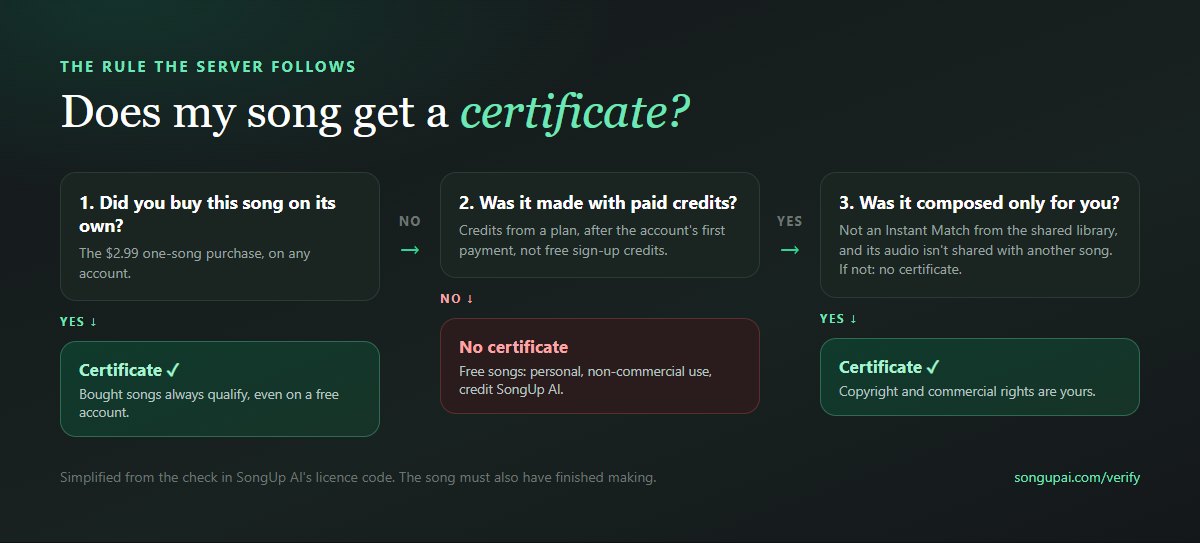
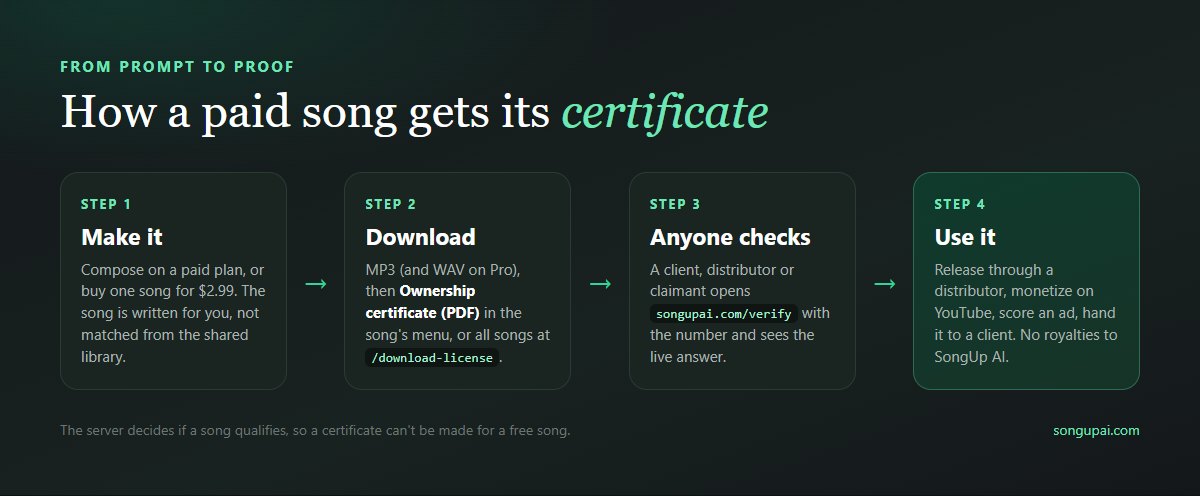
The decision isn't made by the button you press. It's made on our server, by one check that both the certificate download and the public verify page use, so they can never disagree. A song carries the paid-plan rights when it has finished making and either:
- it was bought on its own (the $2.99 one-song purchase, which works even on a free account), or
- it was made with paid credits, after the account had paid for something, using no free sign-up credits, not as an Instant Match, and with audio that no other song shares.
If none of that is true, the server answers "not licensed". On a free account the song menu shows Unlock Commercial License instead of the download; on a paid account, asking for a certificate for an older free song gets the message that free songs are for personal use. Either way, the verify page says it's a free song. Because the check happens on the server, editing the page or changing a URL can't produce a certificate for a free song, and a certificate can only be issued, and only checks out, for a song that really is the holder's.
How to download your certificate
You can get a certificate in two places. Both need you to be signed in to the account that made the song.
From the song itself. Open your Library, open the menu on the song and choose Ownership certificate (PDF). You'll see "Making your certificate…" and then "Certificate downloaded." On a free account, the same row says Unlock Commercial License with a small lock, and opens the plan options instead.
From the licensing page. Download License lists your songs with a download button for each. It's the quickest way to save certificates for a whole album or a batch of client tracks. The page also links the full Song License PDF.
Two related files carry the same number. On Pro and higher, the printable lyric sheet (PDF) for a paid song prints its certificate number with a link to the verify page, which is handy for a CD booklet, a wedding programme or a songwriting folder. And every paid song still has its MP3 (plus WAV on Pro) and the song extras: gift page, lyric video and stems.
Do this once per song
Make a folder for each song you plan to use commercially. Put in it the final audio (WAV if you have Pro), the certificate PDF, the lyrics, your prompt, and a note of the date and plan. If anyone ever asks where the song came from, the whole answer is in one place.
How anyone can check a song
The verify page is public. Nobody needs an account to use it, so you can send the link to anyone.
Check a certificate in three steps
3f9c2a71-5b8e-4d02-9a6c-7e1d4b8f0c25Verify
- Open the link printed on the certificate, or go to songupai.com/verify. The printed link checks the number straight away.
- Or paste the certificate number (the long ID under "Certificate number") into the box and press Verify.
- Read the result. A green "Verified: owned, with commercial rights" means the song was made on a paid plan or bought on its own. Anything else means it wasn't.
Open the verify page →For a paid song, the result shows:
- Song title
- Certificate number
- Asset type: song
- Date created
- Licensed to: the holder's first name and the initial of their last name, for example "Sara K."
- Rights description: that the song was made on a paid plan or bought on its own, and that under section 3 of the Terms its holder owns the copyright and may use it commercially anywhere, with no royalties owed to SongUp AI.
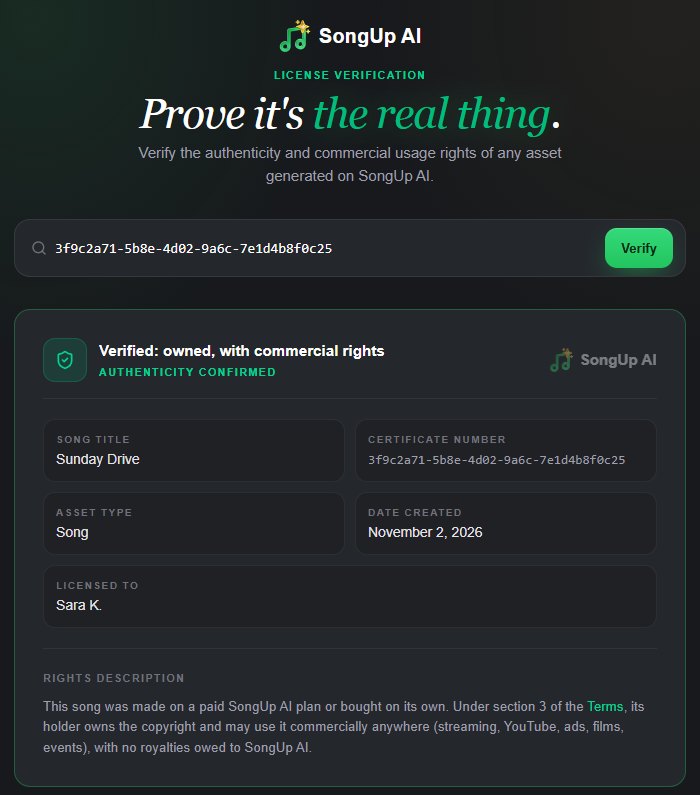
The result above uses a sample number to show the layout; a real certificate number shows that song's details.
Privacy by design. The verify page never shows the account ID, email or full name. Anyone holding a certificate can look its number up, so it shows only what a buyer or a platform needs: that this song exists, is paid, and belongs to a named person. Only the holder can download the certificate itself.
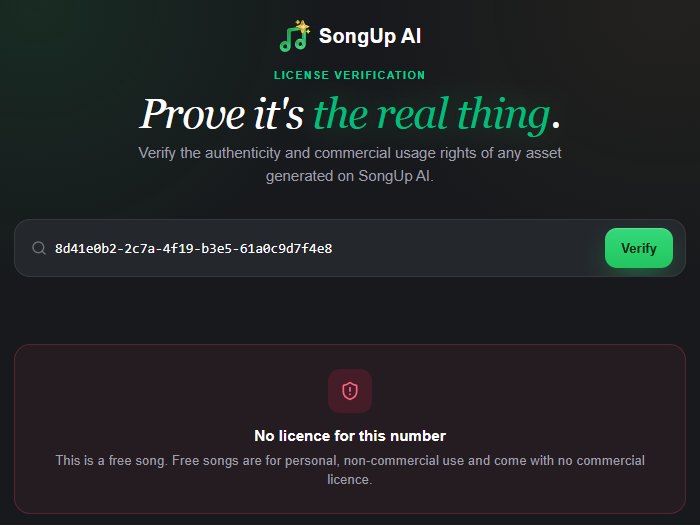
What a free song looks like. If someone checks the number of a free song, the page says: "This is a free song. Free songs are for personal, non-commercial use and come with no commercial licence." A number that doesn't exist gets "We couldn't find any license with this ID." Both are as useful as a green tick: they tell a client or a platform not to rely on that song.
Make a song you own
Why we give a certificate at all
Most AI music tools put the commercial license in their terms and leave it there. We added a certificate and a public check because of what kept happening to people after they made a song.
1. AI songs have no paper trail by default
A song recorded in a studio leaves evidence everywhere: session files, a producer's invoice, a split sheet signed by the co-writers, a dated email with the demo. An AI song can go from idea to finished master in minutes, in a browser, with nothing on paper. When someone later asks "where did this come from?", "I made it on a website" isn't an answer anyone can check. The certificate fills that gap with a dated document and a number tied to the exact song.
2. Monetized videos get claimed
On YouTube, Content ID compares uploads against reference files submitted by rights holders and distributors. When a match is found, the claimant can monetize, track or block your video. Sometimes the claim is right. Sometimes it's a mistake, or a match against a song that sounds similar. When you dispute, YouTube asks you to pick a reason, and one of them is having "all the necessary rights to the content in your video". A certificate number and a public verify link are exactly the evidence that reason calls for.
3. Distributors and stores can ask for proof of rights
Distributors such as DistroKid, TuneCore and CD Baby ask you to confirm you hold the rights to everything you upload, and many now ask about AI use on the upload form. When a release is flagged for review, the fastest answer is a document that says who owns the song, from when, under what terms, with a link the reviewer can open. That's what the certificate is.
4. Clients need paperwork
Ad agencies, brands, video producers and game studios often have someone whose job is to check rights before anything goes live. Handing over an MP3 with "it's AI, it's fine" makes their job harder. Handing over the MP3, the certificate and the verify link makes it a five-minute check. If you make music for others, this alone can be the difference between a yes and a "we'll use stock music instead".
5. "Chain of title" is how the music business works
In sync licensing (music for film, TV, ads and games), music supervisors ask for a clean chain of title: a clear line from the creation of a song to the person licensing it. A certificate doesn't replace a lawyer's review on a big deal, but it gives you the first link in that chain in a form people recognise.
6. It keeps us honest
A certificate only means something if it's withheld from songs that don't qualify. Building the check on the server, refusing certificates for shared library songs, and telling anyone who checks a free song exactly that, holds us to the same standard we ask you to trust.
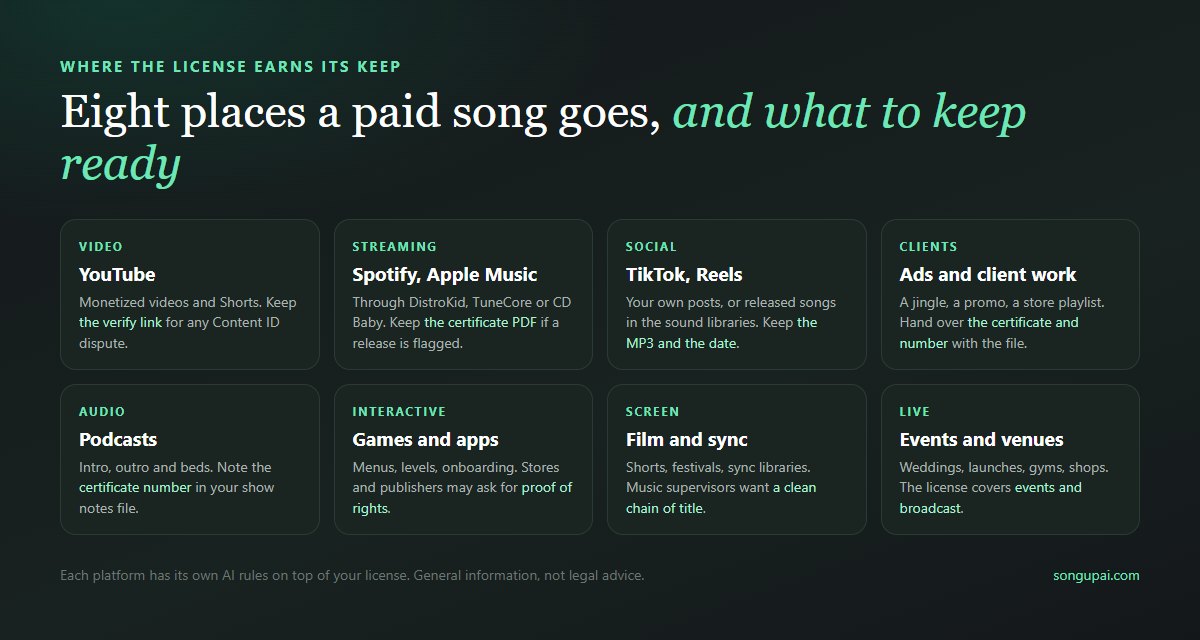
Your license from SongUp AI answers one question: are you allowed to use this song commercially? Each platform then adds its own rules on top. Here's how the two fit together.
YouTube: monetization and Content ID
Using the song in your videos. A paid song can go in monetized videos and Shorts on your own channel. Two YouTube policies apply to everyone using AI:
- Disclosure. Creators must disclose realistic altered or synthetic content in YouTube Studio. YouTube says the label itself doesn't reduce monetization.
- "Inauthentic content". In July 2025 YouTube renamed its "repetitious content" policy to "inauthentic content". Mass-produced, templated or easily repeated uploads can't be monetized, whether or not AI is involved. A real video with AI music in it is fine; a channel of 500 near-identical AI uploads is not.
For background music for your channel, see royalty-free music for YouTube and our guide on how to make background music for YouTube videos.
Registering the song in Content ID. This is a different thing from using it. YouTube only lets a rights holder register material they hold exclusively. Because a paid SongUp AI song is assigned to you and never shared through the library, it's the kind of song exclusivity can apply to. But two cautions:
- Many distributors restrict or refuse Content ID registration for AI-assisted tracks. Check yours before you tick the box.
- If you put a song into Content ID and also license it to clients, their videos will get claimed by your own registration. Most distributors that offer Content ID let you allowlist channels; use that, or skip Content ID for songs you sell as background music.
When a claim lands on your video, follow a calm process:
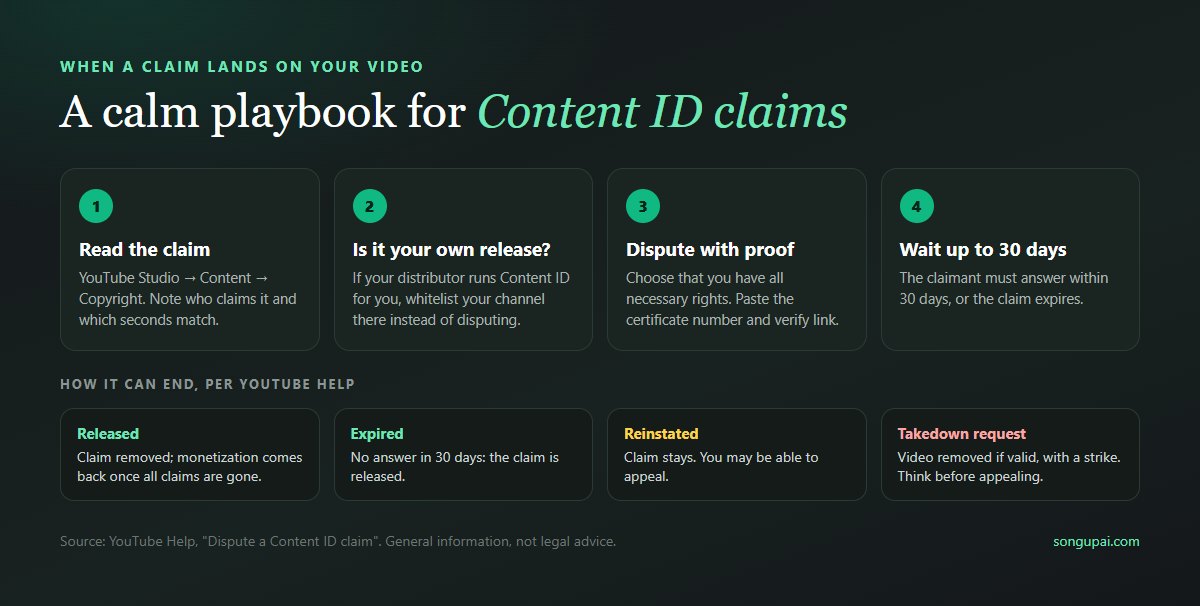
- Read the claim in YouTube Studio: who claims it, and which seconds match.
- Check whether it's your own release. If you distributed the song and your distributor runs Content ID for you, the claim may be your own. Allowlist your channel at the distributor instead of disputing.
- If it's a third party, dispute it and choose that you have the necessary rights. In the explanation, give the song title, the date it was made, the certificate number and the verify link (
songupai.com/verify?id=…).
- Wait. Per YouTube Help, the claimant has 30 days to respond. They can release the claim, let it expire, reinstate it (you may be able to appeal) or submit a copyright removal request. Think carefully before escalating: a valid removal request comes with a copyright strike.
Spotify, Apple Music and other stores, through a distributor
You can't upload straight to Spotify or Apple Music; a distributor delivers your song to them. A paid SongUp AI song can be released this way. What the stores and distributors expect:
- You hold the rights. The certificate covers this, and it's the document to send if a distributor asks.
- No impersonation. Spotify said in September 2025 that vocals imitating a real artist are only allowed with that artist's authorisation. Our license says the same: no license allows "imitating or falsely representing a real artist".
- No spam. Spotify filters mass uploads, duplicates and artificially short tracks. Release a few songs you're proud of, not hundreds.
- Honest disclosure. Spotify supports the industry (DDEX) standard for AI credits, and distributors are adding AI questions to their upload forms. Answer them accurately.
Bandcamp is the notable exception: since January 2026 it doesn't allow music made wholly or mostly by AI. The step-by-step release process, including mastering, cover art, metadata and the distributor comparison, is in our guide on how to make money with AI music, and the one-page version is on Start Earning.
TikTok, Instagram Reels and Twitch
Use paid songs in your own TikToks, Reels, Stories and stream backgrounds. If you release a song through a distributor, it can also appear in the TikTok and Instagram music libraries for others to use, and you earn from those uses through the distributor. Label realistic AI content where the app asks.
Ads, jingles and client work
The license covers advertising, and since copyright is assigned to you, you can pass rights on to a client. When you deliver:
- Send the final file, the certificate PDF and the verify link together.
- Say in writing what you're giving the client (for example, the right to use the song in their campaign, or full ownership), because the certificate is in your name.
- Keep your own copy of everything.
For short brand music, our guides on how to make a jingle and the AI jingle generator are the place to start.
Podcasts, games, apps, film and events
The rights statement on the certificate lists film, podcasts, events and games by name, and the license PDF adds apps and broadcasts. A few practical notes:
- Podcasts: an intro and outro you own means no licensing fees per episode, ever. Keep the certificate number in your show files.
- Games and apps: publishers and stores sometimes ask for proof of music rights during review. Have the certificate ready.
- Film and festivals: festivals and distributors ask for music cue sheets and licenses. The certificate is your license for each SongUp AI cue.
- Events and venues: a wedding entrance, a product launch, a gym class or a shop playlist are all commercial or public uses the license covers.
What the license doesn't do
A license is strong, but it isn't magic. Being clear about its limits will save you trouble.
It doesn't register a copyright. The certificate is our statement that we've assigned you our rights and that the song was made on a paid plan. It isn't a registration with the US Copyright Office or any other office.
It can't make pure AI audio copyrightable where the law says it isn't. In January 2025 the US Copyright Office said that "prompts alone do not provide sufficient human control" to make someone the author of the output, and that human contributions (lyrics you wrote, a melody you composed, your own performance, creative arrangement) can be protected. So you can sell and license your song under our license, but your power to stop others from copying the purely AI-generated parts may be limited. Our longer guide, can you use AI-generated music commercially?, covers the US, EU and UK in detail.
It doesn't override platform rules. YouTube's inauthentic-content policy, Spotify's spam filters and each distributor's AI policy apply whatever license you hold.
It doesn't cover what wasn't yours to begin with. You're responsible for any lyrics, audio or other material you supply. Paste someone else's lyrics, or ask for a song that imitates a real singer, and no license can fix that. Section 4 of the Song License lists what no plan allows: adult content, impersonating a real artist or person, reproducing copyrighted songs, melodies, lyrics or uncleared samples, and hate, harassment, defamation, fraud or content meant to mislead people about who made it. We may withdraw the license for songs made in breach of the Terms.
It isn't exclusive by default for free songs, and it isn't retroactive. A free song stays a free song. Upgrading doesn't convert it; make a new version on your paid plan.
Make your rights stronger: add yourself to the song
Because copyright law protects human authorship, the more of the song that's genuinely yours, the stronger your position. SongUp AI makes this easy:
- Write the lyrics yourself. Paste them into lyrics to song and SongUp AI's music engine sings them line for line. Your lyrics are your own work. Stuck? Start with how to write a song.
- Start from your own melody. Hum to Song builds a full song on a tune you hum, on Pro and higher.
- Record or reshape. Split the song with the Stem Separator, record your own vocal over the instrumental, and finish it with AI Mastering. Our mastering guide walks through it.
- Keep your records. Prompts, lyric drafts, voice memos and project files show your contribution. Keep them with the certificate.
Here's a sense of the range of styles and languages the library covers (SongUp AI sings in 76 languages):
Every AI music tool has its own terms, and they change often. Here's what each says as of early November 2026, from their own public pages where we could read them. Check the current terms before you rely on any of them.
| Tool | Paid plans | Free plan | Proof you can show others | Source |
|---|
| SongUp AI | Copyright assigned to you, commercial use anywhere, no royalties, no credit. Also for single songs bought for $2.99 | Personal, non-commercial; credit required; no downloads | Certificate of ownership PDF with a public verify page | Terms §3, Song License |
| Suno | Suno assigns you its rights in the output; commercial use only for songs downloaded within your plan's allowance; remixes personal use only | Personal, non-commercial use only | Not described in its terms | Suno Terms, revised 10 August 2026 |
| Udio | Downloads switched off for everyone since 30 October 2025, after its settlement with Universal Music Group | Same | Not applicable | Digital Music News |
| ElevenLabs Music | Rights depend on plan: streaming distribution from the Creator plan up; the lower plans exclude film, TV, radio and studio games | Some commercial use online, but no downloads, no streaming distribution and credit required | Not described in its terms | Eleven Music Terms, updated 9 October 2026 |
| AIVA | Copyright owned by you on Pro only; Standard is limited monetization with AIVA owning the copyright | Copyright owned by AIVA, no monetization, credit required | Not described | AIVA pricing |
Two things stand out. First, every serious tool keeps commercial use off its free plan; SongUp AI is no different there. Second, a license in the terms is common, but a per-song certificate that a third party can check isn't something we found in these tools' terms. Suno's terms also say "Suno makes no representation or warranty to you that any copyright will vest in any Output", which is an honest statement of the same legal reality covered in the section above, and applies to every AI tool, including us.
Side-by-side comparisons, including where the other tool is the better choice, are on SongUp AI vs Suno, SongUp AI vs Udio and SongUp AI vs Mureka, and our broader review of the best AI music generators compares eight tools on licensing too.
A checklist before you use a song commercially
Before you release, monetize or deliver
- Made on a paid plan, or bought on its own? If the certificate downloads, it was. If you're told free songs are for personal use, make the song again on your plan.
- Certificate verified? Open the link on it once and see the green result yourself.
- Lyrics yours or written for you? No lines from other people's songs.
- No real artist imitated in the prompt, the title or the voice.
- Best file kept: WAV on Pro, mastered for release.
- AI use disclosed wherever a distributor or platform form asks.
- Records kept: prompt, lyrics, date, plan, certificate, all in one folder.
- For clients: what you're transferring is written down, and they have the certificate and link.
What it costs to get the license
You don't need a big plan to get commercial rights. Every paid option includes them:
- One song, $2.99, paid once ($1.99 in regional-price countries). Ideal for a single jingle, an intro, a gift you might also post, or a first release. No subscription.
- Lite, $3.90 a month, offered only in some countries: 8 brand-new songs a month from your own prompts and lyrics.
- Pro, $9.99 a month ($6.90 in regional-price countries): 21 songs a month, your own lyrics, Hum to Song, MP3 and WAV, lyric sheets with the certificate number, and every tool. The first month is currently $1 for 5 songs for accounts that have never subscribed.
- Pro Plus, $19.99 a month ($13.80 regional): 45 songs a month, for channels, albums and client work. Elite and Ultra go higher.
Unused plan credits roll over while your subscription is active. Payments are non-refundable by default, with a 14-day right of withdrawal in the EU, EEA and UK; the details are in our refund policy. Compare everything on pricing.
Get Pro with the commercial license
Frequently asked questions
Do I own the songs I make with SongUp AI?
Yes, if you made them on a paid plan (Lite, Pro, Pro Plus, Elite or Ultra) or bought them on their own. Section 3 of the Terms assigns you full copyright ownership and commercial rights for those songs. Songs made on the free plan are for personal, non-commercial use and aren't assigned to you.
Can I use SongUp AI songs commercially?
Paid songs, yes: on streaming services, in monetized YouTube videos, TikToks and Reels, in ads, podcasts, films, games, apps and at events, worldwide. You don't pay royalties to SongUp AI or need to credit us.
What is the SongUp AI certificate of ownership?
A one-page PDF for each paid song. It shows the song title, who it belongs to, the date the song was made, the date the certificate was issued, a certificate number and a link to check it at songupai.com/verify.
How do I download my certificate?
Signed in, open the song's menu in your Library and choose Ownership certificate (PDF), or download certificates for all your songs on the Download License page.
How can someone verify that I own a song?
Send them the certificate or its link. They open songupai.com/verify, or paste the certificate number there, and see "Verified: owned, with commercial rights" with the song title, the date it was made and the holder's first name and initial. No account is needed.
Why doesn't my free song have a certificate?
Free songs are matched from a shared library, so the same audio can belong to more than one account. They're for personal, non-commercial use with credit to SongUp AI. To own a song, make it on a paid plan or buy it for $2.99.
If I cancel Pro, do I lose the rights to my songs?
No. Rights follow the plan you were on when each song was made. Songs made while your plan was active and in good standing stay yours, with their certificates.
Can I upload a SongUp AI song to Spotify and Apple Music?
Yes, a paid song, through a distributor such as DistroKid, TuneCore or CD Baby. Follow the distributor's AI policy, disclose AI use where asked and don't imitate real artists. Our release guide has every step.
Will my song get a Content ID claim on YouTube?
It can, like any music. If a third party claims a paid song, dispute it on the grounds that you have the necessary rights and include the certificate number and verify link. If your own distributor's Content ID claims your video, allowlist your channel with the distributor.
Is the certificate a copyright registration?
No. It's SongUp AI's record that the song was made on a paid plan or bought, and that our rights in it are assigned to you. Copyright registration is done with a national copyright office, which may ask you to disclose AI-generated parts and claim only your human contributions.
Can I sell or transfer the song to a client?
Yes. Commercial use includes selling and licensing. Put what you're transferring in writing, and give the client the file, the certificate and the verify link. The certificate stays in your name as the original holder.
Make a song you can prove is yours
The license is what lets you use a song. The certificate is what lets you show it. Make your song on a paid plan, download the certificate, check it once yourself, and keep it with the file.
Make your song with commercial rights
Questions about licensing, a certificate check or a copyright notice? Write to support@songupai.com, or read about SongUp AI and the community guidelines.
Sources: SongUp AI Terms of Service section 3 and Song License, both last updated 2 October 2026; YouTube Help, Qualifying for Content ID and Dispute a Content ID claim; US Copyright Office, Copyright and Artificial Intelligence, Part 2: Copyrightability, January 2025; Spotify, Strengthening AI protections for artists, September 2025; Suno Terms of Service; Eleven Music Terms; AIVA pricing; Digital Music News on Udio downloads. Competitor terms checked on 6 November 2026.

