How to Mash Up Two Songs Online for Free: Match the Tempo and Key, Step by Step (With Real Examples)
S
SongUp Team
SongUp AI Team
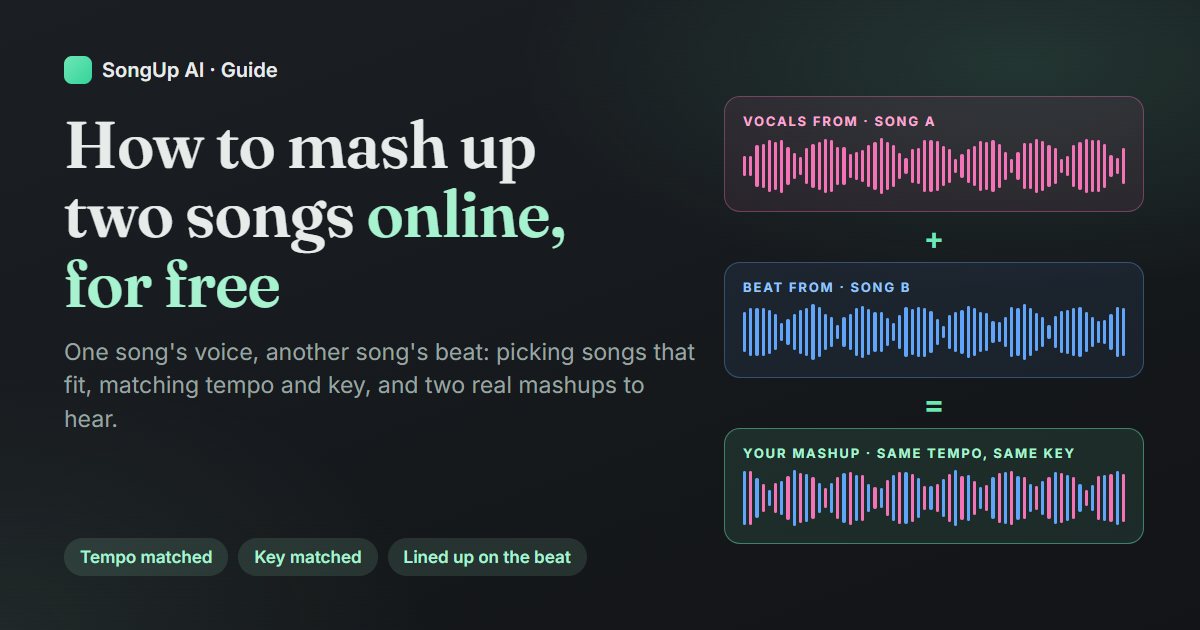
To mash up two songs, you take the singing from one song and lay it over the music of another, at the same tempo and in the same key, with the first sung line landing on a beat. You can do that by hand in an audio editor in about an hour. Or you can let a free online mashup maker do it in a few minutes. This guide covers both ways. It also covers how to choose two songs that will actually fit and how to fix a mashup that sounds off, and it includes two real mashups you can play below.
We build SongUp AI, and our free Mashup Maker is one of the tools in this guide. Where another tool suits a job better, we say so. Every fact about our own tool was checked against its code on 6 November 2026, and the two example mashups were made with the same engine and the default settings, with nothing fixed by hand.
In short
A mashup = vocals from song A + music from song B. The classic form puts an acapella (vocals only) over an instrumental.
Pick songs that are close. Tempos within about 8% of each other (or half or double), keys at most 2 semitones apart, and a clear lead singer over a beat with no strong lead vocal.
Free in your browser: on a computer, the SongUp AI Mashup Maker splits both songs, matches tempo and key, lines the voice up on the drums and mixes it. It needs a free account, and you can download MP3 or WAV with no watermark and no limit.
On a phone: the same tool works on any paid plan, because the songs are split on our servers. The free alternative on a phone is a manual editor such as BandLab.
Posting it: a mashup of other people's songs needs their permission to publish or earn from it. The only fully clear route is to mash up songs you own.
Before any theory, here is what a vocal-over-beat mashup sounds like. We took four songs from the SongUp AI song library, all made by SongUp AI and owned by us, so there's no rights problem in playing them here. We ran them through the Mashup Maker's engine with the default settings. You can hear the two source songs and the result for each pair.
Example mashup 1 · Country vocals over a hip-hop beat · 2:33
Country voice, hip-hop drums
Vocals from “English Country”, beat from “English Hip Hop / Rap”
The mashup
Vocals 95 → 90 BPM (5% slower)Beat untouched at 90 BPMVoice up 3 semitonesLined up on the drums
The two songs were only 5 BPM apart, so the engine left the beat alone and slowed the voice by 5%, well inside the 8% where a voice still sounds natural. It then raised the voice 3 semitones, the shift where the sung notes fit the hip-hop chords best.
Example mashup 2 · Pop vocals over an R&B beat · 2:24
Breakup pop voice, slow-jam R&B beat
Vocals from “English Breakup Pop”, beat from “English Contemporary R&B / Soul”
The mashup
Both songs at 80 BPMNo tempo change at allVoice up 3 semitones (E → G major)Lined up on the drums
This is the easy case: both songs sit at 80 BPM, so nothing is stretched. The voice moves from E major up to G major, which uses the same notes as E minor, the key we measured for the R&B song.
Notice what you don't hear: no drift between voice and drums, and no voice that sounds sped up. Both come from choosing songs that were already close, which is most of what this guide is about.
What a mashup is (and what it isn't)
A mashup joins parts of two or more existing recordings into one new track. The most common kind, and the one this guide is about, is "A over B": the vocals of song A sung over the instrumental of song B. DJs call it an "A vs B" or a bootleg, and on TikTok and YouTube it's often just "song A x song B".
The form became famous in 2004 with The Grey Album, on which the producer Danger Mouse put the acapellas from Jay-Z's The Black Album over music cut from the Beatles' White Album. EMI, the Beatles' label, asked for it to be taken down. On 24 February 2004, which became known as "Grey Tuesday", about 170 websites put it up for free download in protest. It's still the best-known lesson in both halves of mashup-making: how good two unrelated songs can sound together, and how quickly the rights question arrives (more on that in the section on posting).
A mashup is not the same as:
A DJ mix: songs played one after another, blended at the joins. A mashup plays two songs at the same time.
A remix: one song rebuilt with new production. A mashup reuses the parts of other recordings instead.
A medley: several songs performed one after another by the same singer. Nobody sings in a mashup; the original recordings do.
What makes two songs mash up well
Most failed mashups fail before anyone opens an editor, because the two songs were never going to fit. Four things decide it.
1. Tempo: how far apart the BPMs are
Tempo is measured in beats per minute (BPM). To mash two songs up, the vocals have to be stretched until they run at the beat's tempo. A small stretch is inaudible. A big one makes the singer sound rushed or dragged, with a slight phasey smear on long notes.
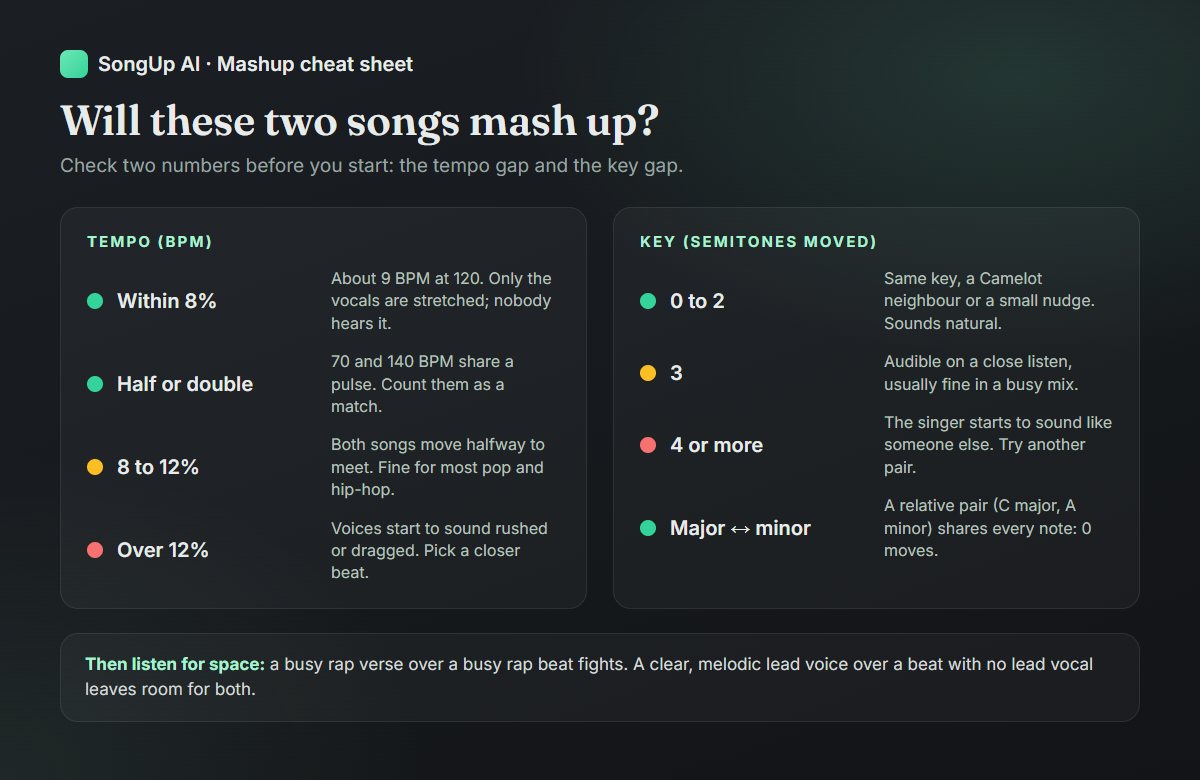
Within about 8% (about 9 BPM at 120 BPM) is the easy zone. The Mashup Maker stretches only the vocals here and leaves the beat alone.
Half or double time counts as a match. A 70 BPM ballad and a 140 BPM trap beat share a pulse: the ballad's beat lands on every other trap beat. The Mashup Maker treats half and double time as the same tempo.
Past 8%, both songs move halfway to meet, so neither one is stretched too far.
Past about 12%, the Mashup Maker warns you that the songs are far apart in tempo. That's the point to look for a closer beat.
Every song sits in a key, a home note plus a set of notes that sound right with it. Put a voice in C major over a beat in F♯ major and nearly every sung note clashes with the chords. So you move (transpose) the voice into the beat's key, and each semitone you move it changes the timbre of the voice a little.
0 to 2 semitones sounds natural.
3 semitones is noticeable on a close listen, and usually fine in a busy mix.
4 or more, and the singer starts to sound like a different person: higher and thinner, or lower and muddier. The Mashup Maker tells you when the voice moved 4 semitones or more.
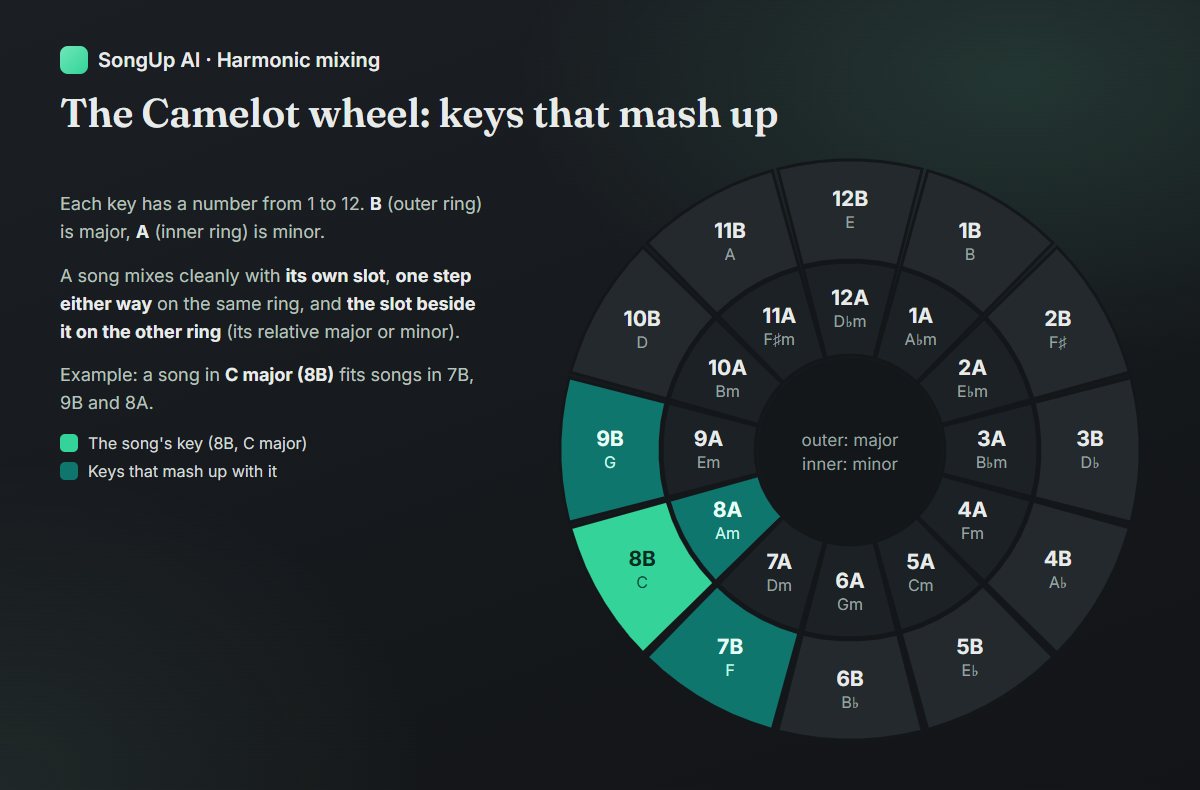
The good news is that you don't always need the same key. A relative major and minor pair (C major and A minor, for example) uses exactly the same notes, so the voice needs no move at all. Keys next to each other on the circle of fifths share six of their seven notes. DJs use a chart called the Camelot wheel, popularised by the DJ software company Mixed In Key, to see those relationships at a glance:
The rule is simple: a song fits songs in its own slot, one number either way on the same ring, and the same number on the other ring. A song in 8B (C major) fits 7B (F major), 9B (G major) and 8A (A minor). It isn't a law of physics, and a good ear beats any chart, but it's a fast way to rule pairs in or out.
The Mashup Maker doesn't stop at the key names. It compares each sung moment with the chord playing under it in the beat. Then it chooses the move, anywhere from 6 semitones down to 5 up, where the most sung notes agree with the chords. That catches cases the key labels miss, such as a song labelled in one key that spends its chorus in another.
3. Space: one voice, one beat
The two parts need room. The best pairings are a clear, melodic lead vocal (pop, R&B, soul, a ballad) over a beat with no strong lead of its own (hip-hop, house, lo-fi, rock with a quiet verse). Two busy parts fight: a fast rap verse over a dense rap beat gives the listener two rhythms to follow. A cappella and instrumental versions mash up best of all, because nothing has to be removed. If you don't have them, AI stem separation gets you close.
4. Shape: where the vocal starts and stops
Songs breathe differently. A verse that starts on beat one of a bar over a beat whose bars start half a beat later sounds sloppy even at the right tempo. A good mashup lines the first sung line up with the start of a bar in the beat. Trim the beat's long intro so the voice comes in quickly, and end the beat soon after the last line instead of letting four minutes of instrumental play out. The Mashup Maker does this for you: it cuts an intro longer than two bars back to two bars before the first line, and it ends one bar after the last line.
Pairings that tend to work
Vocals from
Beat from
Why it works
Pop ballad (slow, melodic)
Lo-fi hip-hop or trap at double time
Half/double-time pulse, lots of space for a long vocal line
R&B or soul
House or EDM
A sustained voice floats over a four-on-the-floor kick
Pop chorus
Hip-hop instrumental
The classic "A vs B" club mashup
Rap verse
Rock or pop instrumental
Rhythmic voice, melodic bed: keep the beat sparse
Folk or acoustic
Afrobeats or reggaeton
Gentle voice, strong groove: a common TikTok format
How to mash up two songs online for free (step by step)
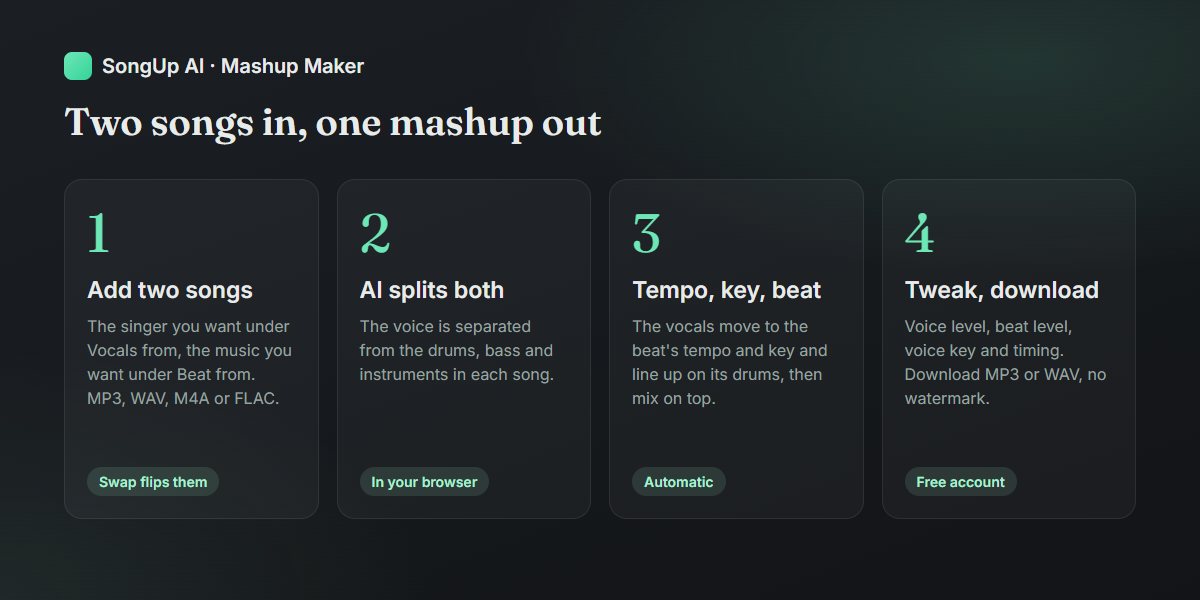
This is the fastest route: two audio files in, a finished mashup out, matched for you. It runs in the browser on any recent computer, and you need a free account.
Open the Mashup Maker on a computer and sign in or create a free account. No card needed.
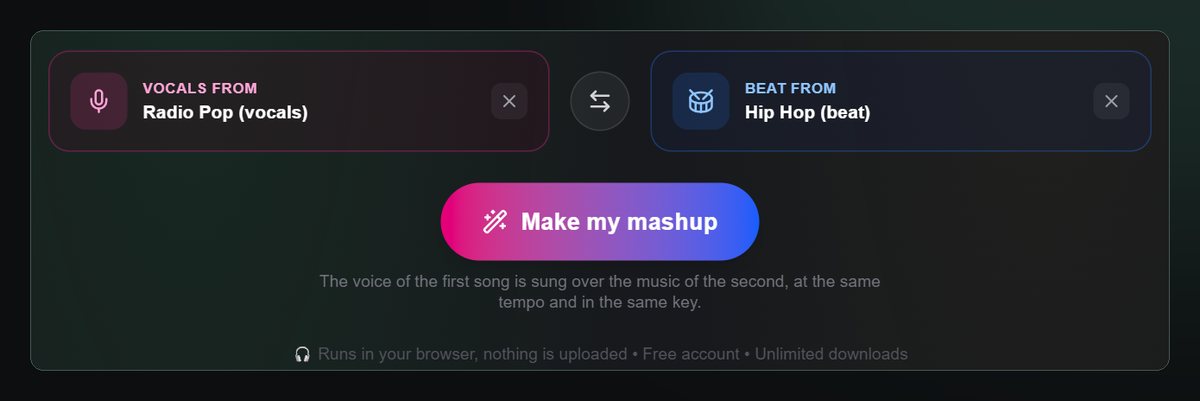
Add the song you want to hear singing under "Vocals from". Use an audio file you have: MP3, WAV, M4A or FLAC. Links from YouTube or Spotify don't work, and downloading audio from those sites is against their terms.
Add the song whose music you want under "Beat from". If you get them the wrong way round, the swap button between the cards flips them. If only your "beat" song has singing, the tool notices and swaps them for you.
Press "Make my mashup". The first time, your browser downloads the AI model that separates voices from music (172 MB, once only). Then it splits both songs into vocals, drums, bass and other instruments, and you'll see whether it's using your graphics card (GPU) or processor (CPU). On a computer with a free account this all happens inside your browser, so the songs never leave your device. On our test computer, with a graphics card, each song took 2 to 3 minutes.
Let it match and mix. It finds each song's tempo from its drums and its key from its instruments. It stretches the vocals to the beat's tempo and moves them into its key. Then it lines the first line up on the drums and mixes the voice on top. The mix uses a low cut and gentle compression on the voice, a short reverb, and a small dip in the beat around 2.5 kHz where the voice sits, all under a limiter.
Listen, then adjust. Four controls change the mix, and the mashup remixes on its own after each change:
Voice level and Beat level: up to 12 dB louder or quieter.
Voice key: up to 4 semitones up or down from the automatic match. Try this first if a line sounds sour.
Voice timing: moves the voice up to 8 beats earlier or later. Use it if you'd rather start on the chorus, or if the voice lands a beat late.
Download the mashup as MP3 (256 kbps) or WAV. There's no watermark and no limit on mashups or downloads.
What the chips mean. After a mix, the result shows each song's BPM, how far the voice moved in key, and how it was aligned. "Lined up on the drums" means the two drum patterns were matched. "Snapped to the beat" means the drums were too different to compare, so the first line was placed on the beat grid instead. That's still in time, but try Voice timing if it starts somewhere odd.
Limits worth knowing. On a computer the first 3 minutes 20 seconds of each song are used, which covers a verse and chorus or two of most songs. A computer with 4 GB of memory or less is treated like a phone (next section). The run is just two songs at a time; to choose every part yourself, use AI Blend.
How to make a mashup on an iPhone or Android phone
Separating a voice from a song needs an AI model that is too big for a phone's memory. So on phones and tablets the Mashup Maker sends the two songs to SongUp AI's servers to be split. That needs any paid plan. It uses the first minute of each song, and it usually takes 3 to 5 minutes. The mix itself still happens on your phone. You can lock the screen or leave the page while the songs are split; the mashup picks up where it left off when you come back.
If you'd rather not pay, there are two free routes:
Use a computer. Add the songs on a laptop or desktop and the Mashup Maker is free, with up to 3:20 of each song.
Edit by hand on the phone. BandLab's free studio (iOS, Android, web) lets you put two songs on separate tracks, split out a voice with its Splitter (2 splits a day on its free plan) and line them up yourself. Tempo and key are up to you, so read the manual method first.
Fixing a mashup that sounds off
What you hear
Likely cause
Fix
The voice drifts away from the drums over time
Tempo detected at the wrong half or double, or a song with a changing tempo
Pick a beat with a steady tempo; songs recorded to a click track work best
A few lines sound sour against the chords
The songs share little harmony, or the key was misread
Voice key one step up or down; or a beat closer in style
The singer sounds chipmunky or slowed down
The voice moved 4+ semitones or the tempo gap is over 12%
Choose a pair closer in key and tempo (see the cheat sheet)
The vocal starts on an awkward beat
Alignment snapped to the grid
Voice timing, one or two beats at a time
Faint drums or guitar left in the vocal
Stem separation isn't perfect on dense mixes
Turn Voice level down 2-3 dB and Beat level up; dense rock mixes leave the most behind
Two voices at once
The beat song had singing that wasn't fully removed, or you swapped them
Check which song is under which card; a beat with less singing helps
It's all too loud or crunchy
Both songs are mastered loud
Lower Beat level; the limiter keeps the peaks under control
When you want more control than vocals over a beat
The Mashup Maker makes one kind of mashup very quickly. For anything else:
Pick every part yourself:AI Blend splits both songs and lets you choose each stem from either song, such as the drums of one, the bass of the other and both vocals. It matches tempo and beats but not key, and it exports the blend as WAV or every stem as a ZIP for a DAW. It's free with a free account on a computer.
Polish the result:AI Mastering for loudness, and Autotune Online if a moved voice needs a touch of pitch correction.
How to mash up two songs by hand in Audacity or a DAW
If you want full control, or you're mashing up three songs or building a long edit, do it by hand. It's the same five steps the Mashup Maker automates, in any editor: Audacity (free), GarageBand, FL Studio, Ableton Live, Logic or BandLab.
Get the two parts. You need an acapella of song A and an instrumental of song B. Official acapellas and instrumentals sound best: some artists release them, and DJ pools carry many. Otherwise, separate them with a stem splitter.
Find both tempos and keys. Use a Key & BPM Finder or tap the tempo yourself. Write them down, along with the Camelot code.
Match the tempo. Stretch the acapella to the instrumental's BPM without changing its pitch. In Audacity that's Effect > Pitch and Tempo > Change Tempo: enter the original BPM and the target BPM. The newest Audacity versions call it Sliding Stretch. In a DAW, set the project to the beat's BPM and turn on warp or flex time for the vocal clip.
Match the key. Move the acapella by the number of semitones between the two keys, choosing the smaller direction (5 down rather than 7 up). In Audacity: Effect > Pitch and Tempo > Change Pitch, set in semitones. Better still, compare a few options by ear: the right move is the one where the chorus stops clashing.
Line it up. Zoom in on the instrumental, find the start of a bar (the kick on beat one), and drag the acapella so its first word lands there. Check it at the chorus too: if it drifts, the tempo is slightly off.
Mix it. Cut the low end from the vocal (below about 100 Hz) so it doesn't fight the bass. Dip the beat a little where the voice sits (2-4 kHz), add a short reverb so the voice sits in the same room, and balance the levels. If the beat's intro is long, cut it to a few bars.
Arrange. Decide where the mashup starts (many start on a chorus), loop or cut sections of the beat so the song structures line up, and fade out after the last line.
Doing it by hand takes 30 minutes to a couple of hours the first time, mostly in steps 5 and 7. The result is entirely your choice, and it's how every famous mashup was made.
A quick automatic mashup exported as a short video
Free, no sign-up (per its site)
Its site doesn't say
Fadr Remix Maker
Remixing from stems
Free plan, MP3 downloads
Uploaded
BandLab Studio
Arranging by hand on a phone
Free; Splitter 2 a day
Uploaded
Audacity
Full manual control
Free, open source
Stay on your computer
Mixxx
Live DJ-style blending
Free, open source
Stay on your computer
Which to pick: the Mashup Maker for a matched vocal-over-beat result in minutes; RaveDJ if you only have links and don't need control; Audacity or a DAW when the mashup is a project, not a quick idea.
Can you post a mashup on YouTube, TikTok or Spotify?
Plainly: a mashup of other people's songs is built from their recordings, so publishing it or earning from it needs their permission. Each commercial song usually has two copyrights, one in the composition (owned by the writers and publishers) and one in the recording (usually owned by the label). A mashup uses both, for both songs. Unlike a cover, there is no automatic license for remixes or mashups, so permission has to be asked for directly. This isn't legal advice, but it's how every platform treats it:
YouTube runs Content ID. If your mashup matches a song in its database, the video gets a claim. The rights owner's settings decide what happens: the video can be blocked, monetized by the owner (sometimes sharing revenue with you), or just tracked. A claim isn't a copyright strike and usually doesn't affect your channel. A takedown request is different: a valid one gives you a strike. See YouTube's pages on Content ID claims.
TikTok and Instagram license a lot of popular music for use inside their apps. That's why mashups of hit songs are common there. But a license for their in-app sounds isn't a license for you to sell or distribute the mashup anywhere else.
Spotify, Apple Music and other stores take music only through distributors, and distributors ask you to confirm you own or have licensed everything in the track. A mashup of two commercial songs fails that test without written permission.
SoundCloud has its own guides to uploading mashups, remixes and DJ mixes. Rights holders can still have uncleared uploads removed.
At home, in a DJ set, or for practice, nobody needs to hear from you. Clubs and venues usually hold their own public-performance licenses for the music they play.
The fully legal way: mash up songs you own
There's one route with no permission to ask for: mash up songs you own. That can mean your own recordings, or songs you made on SongUp AI on a paid plan or bought on their own for $2.99, whose copyright is assigned to you. Our guide to the AI music commercial license explains what that covers.
It also opens a creative trick: make the two songs you want to mash up. Write one song as a slow R&B ballad and another as a hip-hop beat in the same key, then put the voice of one over the other. Or make two versions of your own chorus in different genres and see which voice sits best on which beat. Ask for the tempo and key you want in the description ("90 BPM, A minor"), and you start the mashup with nothing to stretch or move.
You'll hear a free 30-second preview of your own song before paying anything. One full song is $2.99, paid once, and Pro starts at $9.99 a month for 21 songs, with lower prices in some countries.
Mashup ideas to try today
Genre swap: your favourite ballad's vocal over a drill, Afrobeats or house beat.
Throwback x now: a 70s soul or disco vocal over a modern pop instrumental. Older songs were often recorded without a click track, so pick a steady one.
Two languages: a Spanish, Arabic or Hindi vocal over an English-language beat, or the other way round. SongUp AI makes songs in 76 languages if you want to make both halves yourself.
Wedding or party edit: the couple's song over a dance beat for the moment the dance floor opens. Keep it under three minutes.
The slowed version: a fast pop vocal over a lo-fi beat at half time.
Practice tool: a singer's acapella over a backing track in your own key, to practise harmonies.
Frequently asked questions
How do I mash up two songs for free?
On a computer, open the SongUp AI Mashup Maker with a free account. Add the song with the singing under "Vocals from" and the song with the music under "Beat from", then press "Make my mashup". It splits both songs in your browser, matches tempo and key, lines the voice up on the drums and mixes it. Download MP3 or WAV with no watermark and no limit. To do it by hand for free, use Audacity: stretch the acapella to the beat's tempo, shift it into the beat's key and line up the first word on a downbeat.
What makes two songs good for a mashup?
Close tempos (within about 8% of each other, or half or double), keys at most a couple of semitones apart or neighbours on the Camelot wheel, and a clear lead vocal over a beat with no strong lead of its own. Songs recorded at a steady tempo line up best.
Do the songs need the same BPM?
No, but the closer the better. The vocals are stretched to the beat's tempo, and small stretches are inaudible. Half and double time count as the same tempo. Past about 12% apart, voices start to sound rushed or dragged.
Do the songs need to be in the same key?
They need to end up in compatible keys. The voice can be moved into the beat's key; up to about 2 semitones sounds natural, and 4 or more changes the singer's character. A relative major and minor pair (such as C major and A minor) needs no move at all.
Can I make a mashup from YouTube or Spotify links?
Not with the Mashup Maker, which works on audio files you have. Downloading audio from YouTube or Spotify is against their terms. RaveDJ is the tool that starts from links, with little control over the result.
How do I make a mashup on my iPhone?
In Safari or Chrome, the SongUp AI Mashup Maker works on any paid plan: the two songs are split on our servers (the first minute of each), and the run carries on if the screen locks. Free options are to use a computer instead, or to edit by hand in BandLab's free app.
How long does it take?
On a computer, 2 to 3 minutes per song to split in our tests on a recent laptop with a graphics card, plus a one-time 172 MB model download the first time. Older computers and Safari take longer. On a phone, splitting on our servers usually takes 3 to 5 minutes.
Can I add three or more songs?
The Mashup Maker takes two songs at a time. To combine three, make a mashup of two, then use the result as the beat for a third vocal. For full control over several songs, use a DAW or Audacity.
Is it legal to make mashups?
Making one for yourself, to practise or to play at home, is fine. Publishing or earning from a mashup of songs you don't own needs permission from the rights holders of both songs. Mashups of songs you own, including SongUp AI songs made on a paid plan or bought on their own, are yours to publish.
Will YouTube take down my mashup?
If it contains songs in YouTube's Content ID database, it will probably get a claim, and the rights owners choose whether to block it, run ads on it or just track it. A claim isn't a strike. A takedown request from a rights holder is, if valid.
What is the best free mashup maker?
For an automatic vocal-over-beat mashup matched in tempo and key, the SongUp AI Mashup Maker (free on a computer). For fully automatic mashups from links, RaveDJ. For manual control, Audacity. For live DJ blending, Mixxx. The full comparison is in best free mashup makers.
Create Music with SongUp AI — Free
Generate radio-ready songs from simple text prompts, isolate stems, auto-master, and remix in seconds. No credit card required.